Real Estate Telecalling Software: Manage Calls, Leads & Follow-Ups
A real estate sales team rarely has a lead problem. Enquiries come in from 99acres, Housing, MagicBricks, Facebook ads, and the project website, often within the same hour. The real problem is what happens next: who calls the buyer, how fast, and whether anyone remembers to follow up three days later when the buyer said “let me think about it.”
This is exactly what real estate telecalling software is built to fix. It brings every enquiry, call and follow-up into one system, so agents spend their time talking to buyers instead of hunting for phone numbers across spreadsheets and portal dashboards.
Real estate telecalling software is a system that captures property enquiries from multiple sources, assigns them to agents, dials buyers automatically or semi-automatically, logs every call outcome, and schedules follow-ups so no lead is forgotten. It replaces manual dialing, Excel trackers and scattered WhatsApp chats with one connected workflow.
Why Real Estate Teams Struggle Without It
Property buying decisions take weeks or months. A buyer who enquired about a 2BHK today might book a site visit next week and sign three weeks later — if someone keeps in touch at the right moments.
Most real estate teams run into the same set of problems:
- Leads land in different places. Portal leads, ad leads and website form leads sit in separate inboxes or spreadsheets, so agents work from an incomplete picture.
- Duplicate enquiries waste agent time. The same buyer often enquires on two portals for the same project, and without de-duplication, two agents may call the same person.
- Manual dialing is slow. Looking up a number, dialing it, waiting, and then manually noting the outcome adds up to a lot of dead time across a working day.
- Follow-ups slip through the cracks. A buyer who says “call me after Diwali” is easy to forget without a reminder system.
- Managers can’t see what’s actually happening. Without live reporting, a sales manager only finds out a lead went cold after it’s too late to recover.
These are process problems, not people problems. Real estate telecalling software is designed to solve them directly.
How Real Estate Telecalling Software Works
The typical workflow looks like this:
- Leads are captured automatically. Enquiries from real estate portals, Facebook and Instagram ads, Google Ads, and website forms flow into one pipeline instead of separate inboxes.
- Duplicate leads are filtered out. If the same buyer enquires twice for the same project, the system flags or merges the duplicate so two agents don’t call the same person.
- Leads are assigned to agents. Assignment can follow simple rules — by project, location, or agent workload — so a lead doesn’t sit unattended.
- The system dials or queues the call. An auto dialer moves through the assigned list so agents spend more time talking and less time dialing.
- Agents log the outcome in one tap. Interested, not reachable, site visit scheduled, not interested — the call outcome updates the buyer’s record instantly.
- Follow-ups are scheduled automatically. A reminder is set based on the outcome, so the next call happens on time.
- Managers see live reports. Calls made, leads converted, and pipeline value are visible without asking each agent for an update.
Understanding the Real Estate Sales Journey
Property sales rarely move in a straight line. A buyer typically passes through recognisable stages, and telecalling software works best when it mirrors this journey rather than forcing a generic sales process onto it.
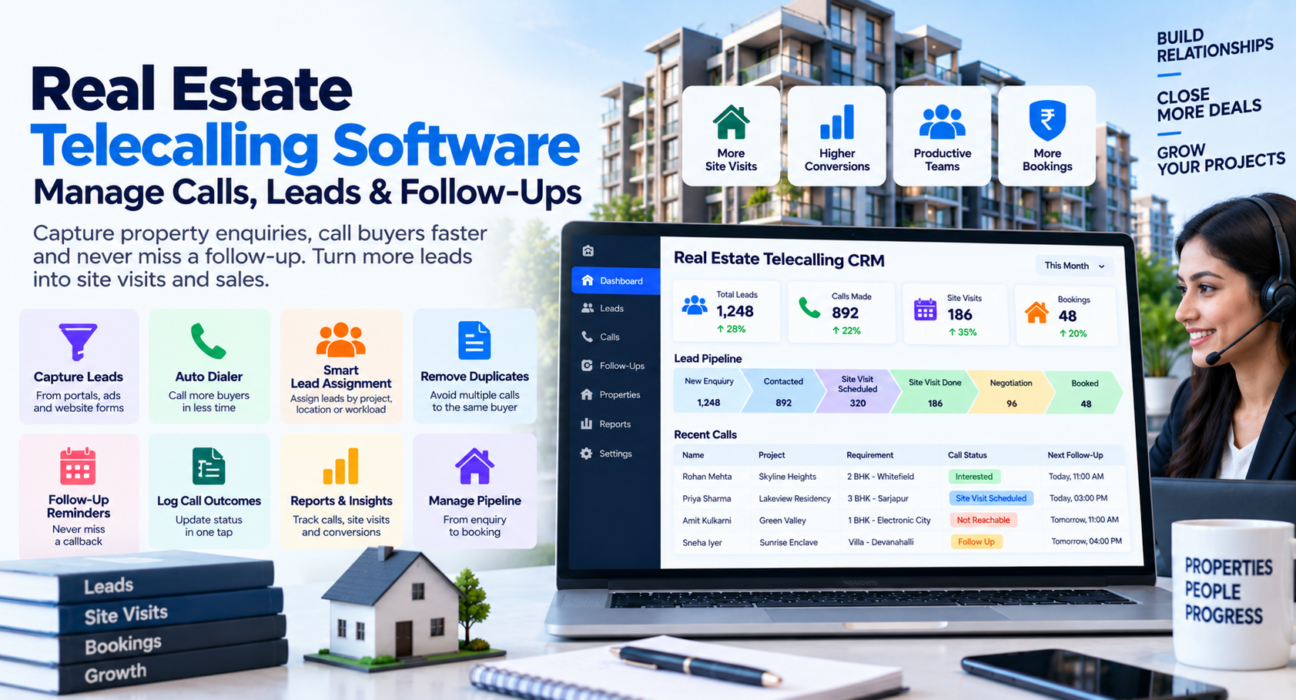
A common pipeline for real estate looks like this:
| Stage | What Happens |
|---|---|
| New Enquiry | Buyer enquires via a portal, ad, or website form |
| Contacted | Agent makes first call and understands requirement |
| Site Visit Scheduled | Buyer agrees to visit the property |
| Site Visit Done | Visit completed, agent notes feedback |
| Negotiation | Price and terms are discussed |
| Booked | Buyer agrees to proceed |
| Closed / Lost | Deal is closed, or buyer drops out |
Tracking a lead through these stages, rather than as a flat list of names and numbers, gives both agents and managers a clear picture of where each buyer stands and what should happen next.
What Good Real Estate Telecalling Software Should Capture
Generic contact fields (name, phone, email) are not enough for property sales. Useful lead management software for real estate should let agents log details specific to the buyer’s requirement, such as:
- Budget range
- Property type (flat, plot, villa)
- Configuration (1 BHK, 2 BHK, 3 BHK)
- Preferred location
- Possession timeline
- Whether a home loan is required
- Lead source (which portal or ad the enquiry came from)
Capturing this data at the call stage — instead of trying to recall it later — means any agent can pick up a lead and know exactly what the buyer is looking for.
Practical Example: A Builder Sales Team
Consider a builder launching a new residential project. In the first week, enquiries come in from 99acres, Housing.com, MagicBricks, and a Facebook ad campaign — often 150-plus leads a day.
Without a telecaller CRM, these leads sit in four different places. Agents manually copy numbers into a calling sheet, and by the time someone calls a buyer, a competing project’s agent may have already reached them.
With real estate telecalling software in place, all four sources feed into one pipeline automatically. Leads are de-duplicated, assigned to pre-sales agents, and queued for calling within minutes of the enquiry coming in. This kind of setup is one of the reasons project teams look for tools like a real estate telecalling software built specifically around portal integrations and site-visit tracking, rather than adapting a generic sales CRM.
This is a hypothetical example to illustrate how the workflow typically plays out; actual results depend on team size, lead volume and how consistently the process is followed.
Real-World Example: Channel Partners and Brokers
Brokers who sell across multiple builder projects face a different challenge — they need to track which buyer is interested in which project, from which developer’s inventory, without mixing up leads.
Sales calling software built for this use case allows brokers to tag leads by project, track site visits across properties, and see which developer’s inventory is converting better. A follow-up reminder ensures that once a site visit is marked “done,” the lead is called again until it results in a booking or a clear “not interested.”
Benefits of Using Real Estate Telecalling Software
| Benefit | Why It Matters |
|---|---|
| Faster first response | Leads are called within minutes, while interest is still fresh |
| No duplicate calling | De-duplication avoids two agents contacting the same buyer |
| Organised follow-ups | Reminders reduce the number of leads that go cold from neglect |
| Clear pipeline visibility | Managers see exactly how many leads are at each stage |
| Accountability | Call logs and reports show individual agent performance |
| Centralised buyer data | Budget, location and configuration preferences are recorded once and visible to any agent |
Common Mistakes Real Estate Teams Make
- Treating every enquiry as equally hot. Without lead scoring or clear stages, agents waste time on unqualified leads while genuine buyers wait.
- Ignoring de-duplication. Calling the same buyer twice from two different agents creates a poor impression of the brand.
- Skipping follow-up scheduling. A verbal promise to “call back later” is easy to forget without a system-generated reminder.
- Not tracking site visits properly. If site visit outcomes aren’t logged, it’s hard to tell which leads are genuinely progressing.
- Overlooking mobile access. Field agents who can’t log calls or check follow-ups from their phone end up updating records a day late, if at all.
What to Consider Before Choosing Real Estate Telecalling Software
Before adopting any CRM for telecallers, real estate businesses should think through:
- Which portals and ad platforms need to connect — 99acres, Housing, MagicBricks, and Facebook/Instagram ads are common sources for Indian real estate teams.
- How many agents will use it, since pricing on most tools scales with team size.
- Whether the pipeline stages match your actual sales process, rather than a generic sales funnel.
- Whether the mobile app supports the way your agents actually work — many real estate teams have agents in the field, not just at a desk.
- How follow-up reminders are handled, since forgotten follow-ups are one of the biggest reasons real estate leads go cold.
How TeleCallingCRM Supports Real Estate Sales Teams
TeleCallingCRM is built around this exact workflow for real estate teams. It connects directly with 99acres, Housing.com, MagicBricks, and Facebook and Instagram lead ads, so enquiries land in one pipeline automatically, de-duplicated and assigned to an agent.
The platform includes a pipeline with real estate-specific stages — New Enquiry, Contacted, Site Visit Scheduled, Site Visit Done, Negotiation, Booked, and Closed/Lost — along with lead fields for budget, property type, configuration, preferred location, possession timeline and loan requirement. An auto dialer moves agents through their assigned call list, follow-up reminders are scheduled automatically based on call outcomes, and a live dashboard shows calls, leads and conversions as they happen. It also has an Android and iOS mobile app for agents working site visits in the field.
This kind of setup is useful whether a team is a builder’s in-house pre-sales desk or a broker managing buyers across several projects, since the core need — fast response, organised follow-up, and clear pipeline visibility — is the same either way.
FAQs
What is real estate telecalling software?
It is software that captures property enquiries from portals, ads and websites, assigns them to agents, supports calling and outcome logging, and schedules follow-ups — all from one connected system rather than spreadsheets and separate inboxes.
Is telecalling software different from a general CRM?
Yes. A general CRM manages contacts and deals broadly, while telecalling software is built around the calling workflow specifically — auto dialing, call logging, and follow-up scheduling are central rather than add-ons.
Can it pull leads automatically from portals like 99acres or MagicBricks?
Most real estate-focused telecalling tools connect directly with major property portals and ad platforms, so enquiries flow into the system automatically instead of needing manual entry.
Do agents need to dial numbers manually?
Not with an auto dialer. The system queues assigned leads and moves agents from one call to the next, reducing idle time between calls.
How does it help with site visit follow-ups?
Once a site visit is marked complete, the system can schedule a follow-up reminder automatically, so the lead is called again for feedback or next steps instead of being forgotten.
Is this useful for individual brokers, or only builder sales teams?
Both. Builder sales teams use it to manage high lead volume from a project launch, while brokers use it to track buyers across multiple projects and developers in one place.
Does real estate telecalling software work on mobile?
Good real estate telecalling tools include a mobile app, since many agents are out doing site visits and need to call, log outcomes, and check follow-ups away from a desk.
Conclusion
Real estate sales depends on speed and consistency — reaching buyers quickly and following up reliably until a decision is made. Manual processes make this hard to sustain once lead volume grows beyond a handful of enquiries a day.
Real estate telecalling software brings lead capture, calling, and follow-up management into one workflow, so agents spend their time selling rather than tracking down information. Teams evaluating options can look at how a dedicated lead management software for real estate handles portal integrations, pipeline stages and follow-up scheduling before deciding what fits their sales process best.