How TeleCalling CRM Integrates With WhatsApp for Lead Management
Telecalling CRM with WhatsApp integration lets your team call a lead, send a brochure on WhatsApp and keep both on one timeline. Some leads miss calls but reply to a message within minutes, and a follow-up that lives in a personal WhatsApp chat is invisible to the rest of the team. Bringing calls and messages into one record fixes that.
This guide explains how WhatsApp fits into lead management, what rules apply, and how to set it up. If you want to see the messaging side of a calling CRM with built-in messaging, the features page is a good reference.
Disclosure: this blog is published by TeleCalling CRM. We mention our own product where relevant, but the guidance applies to any good tool.
What Is a Telecalling CRM With WhatsApp Integration?
A telecalling CRM with WhatsApp integration connects your calling and lead records with WhatsApp messaging. Agents can send templates or brochures, schedule messages and read the conversation on the same lead timeline as calls and notes, instead of switching between the CRM and a separate WhatsApp app.
Why WhatsApp Matters for Lead Follow-Up
- Missed calls: a message gives the lead something to reply to when they cannot talk.
- Details in writing: prices, brochures, location pins and document lists are easier to read than to hear.
- One history: calls, messages and notes stay together, so any agent can pick up the conversation.
- Less data on personal phones: when agents chat from personal accounts, the history leaves with them.
- Faster follow-ups: a template can be sent in seconds right after a call.
How a Telecalling CRM With WhatsApp Integration Works
The details vary by product, but the flow is usually similar:
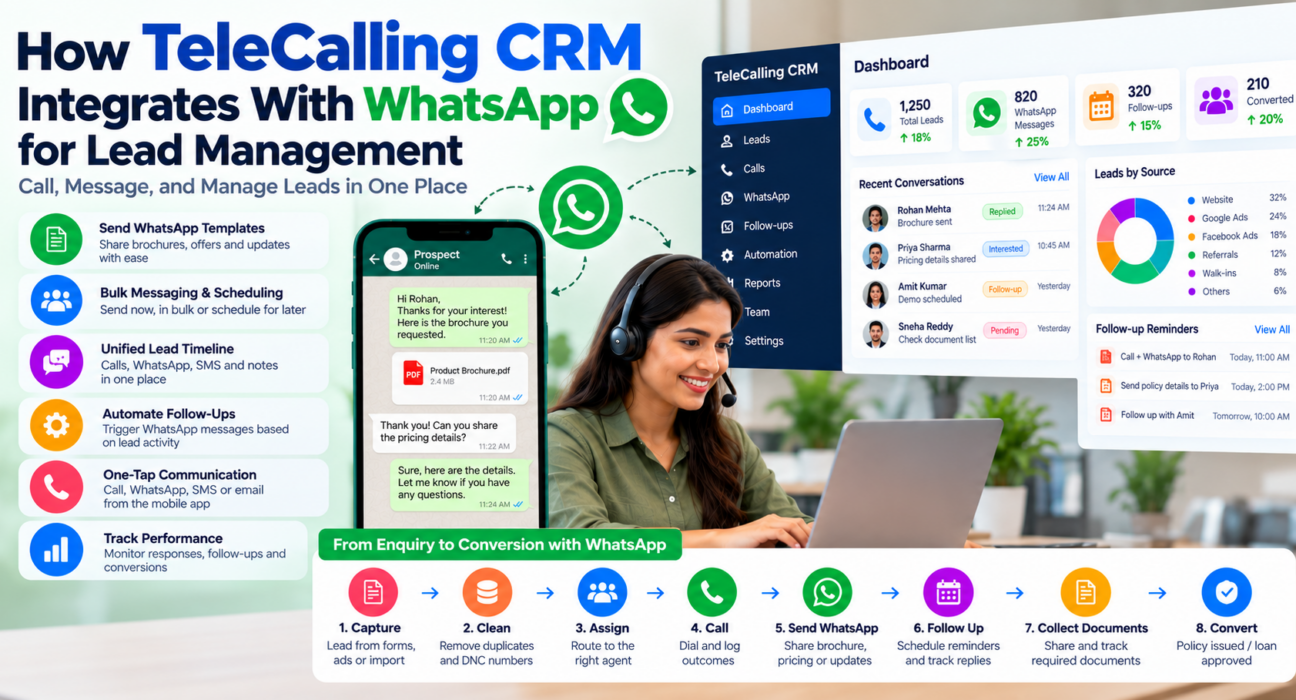
- A lead arrives from an ad, portal, form or import and is assigned to an agent.
- The agent calls and logs the outcome.
- A message is sent, manually or by a rule, such as a brochure after an “interested” outcome.
- The lead replies, and the reply appears on the lead’s timeline.
- A follow-up is scheduled, with a reminder for the next call or message.
- Managers review responses, overdue follow-ups and stage movement.
What TeleCalling CRM Offers for WhatsApp Lead Management
Based on its website, TeleCalling CRM includes these messaging capabilities:
- WhatsApp templates: reusable templates with per-lead personalisation
- Bulk send and scheduling: send now, send in bulk or schedule for later
- Unified timeline: SMS, email and WhatsApp on one thread per lead
- Mobile shortcuts: one-tap call, WhatsApp, SMS or email from the mobile app
- Automation: a no-code workflow builder that can send SMS, email or WhatsApp, triggered by lead creation, call outcomes, stage changes or follow-ups becoming due
- Related tools: auto dialer, follow-up reminders, lead assignment, pipeline and reports
The website says every feature is included in every plan. Per its pricing page, Basic is ₹999 per month for up to 5 users and Pro is ₹1,599 per month for up to 10 users, excluding GST. A 3-day free trial is mentioned. For SMS and email, the site says you bring your own MSG91 and DLT account and your own SMTP.
Not stated on the website: how WhatsApp is connected, whether you need your own provider or number, and who pays WhatsApp message charges. Ask the team these questions before you decide. See the integration guides for the lead sources it documents.
WhatsApp Rules You Should Know
If a CRM uses the official WhatsApp Business Platform, Meta’s rules apply:
- 24-hour customer service window: after a customer messages you, you can reply freely for 24 hours.
- Templates outside the window: to message someone after the window closes, or to start a chat, you need an approved template.
- Per-message pricing: since 1 July 2025, Meta charges per template message, with utility templates free inside an open service window. See Meta’s pricing page for current rates and categories.
- Permission: get the contact’s consent before sending, give an easy way to opt out and keep a record of consent.
These rules apply to the official platform. Click-to-chat links and the regular WhatsApp app work differently, so ask any vendor which method it uses. Calling rules also still apply. India’s TRAI regulations are set out in the Telecom Commercial Communications Customer Preference Regulations, 2018, and compliance remains your responsibility.
A Practical Message Plan for Lead Follow-Up
This is a hypothetical example plan. Adjust it to your business and check template rules.
| Moment | Message idea | Next step |
|---|---|---|
| Missed call | Short note asking for a good time to talk | Retry the call |
| Interested | Brochure or price list | Schedule a follow-up call |
| Callback agreed | Reminder with the agreed time | Call on time |
| Visit or demo fixed | Confirmation with place and time | Reminder the day before |
| Quote sent | Brief check-in | Follow up in two or three days |
| No response | One gentle nudge | Pause, do not chase endlessly |
Keep messages short, personal and useful. One clear question works better than a long pitch.
Examples by Industry
These are hypothetical examples.
- Real estate: after a call, send the brochure and location pin, then a visit confirmation. See our guide on property enquiries and follow-ups.
- Education: share fee details and a demo-class link after counselling, and remind parents before the session.
- Insurance: send a renewal reminder and a document checklist before the due date.
How to Set Up a Telecalling CRM With WhatsApp Integration
- Decide your use cases. Start with two or three, such as missed-call messages and visit confirmations.
- Confirm how WhatsApp is connected. Ask the vendor which method is used, who provides the number and what it costs.
- Collect consent. Record how and when each contact agreed to receive messages.
- Create short templates. Use clear wording, and keep marketing and utility messages separate.
- Link messages to outcomes. For example, send the brochure when the outcome is “interested”.
- Train agents and review weekly. Check replies, response times and opt-outs, then refine.
Benefits and Limitations of a Telecalling CRM With WhatsApp Integration
Benefits
- Calls, messages and notes in one lead history
- Faster follow-ups after missed calls
- Consistent messaging through templates
- Less reliance on personal phones
- Better visibility for managers
Limitations
- WhatsApp rules, templates and costs still apply.
- Messages do not replace conversations. Poor wording can annoy leads.
- Over-messaging hurts trust and can lead to opt-outs.
- Integration methods differ between vendors, so features vary.
- Results depend on lead quality, offer and agent skill.
What to Ask Before Choosing a Telecalling CRM With WhatsApp Integration
- How is WhatsApp connected: official platform, click-to-chat or another method?
- Who provides and owns the WhatsApp number?
- Are WhatsApp message charges included, or billed separately?
- How are templates created and approved?
- Can replies appear on the lead timeline?
- Can messages be triggered by call outcomes or stages?
- Can I schedule and send in bulk?
- How is consent recorded, and how are opt-outs handled?
For a wider buying process, see our selection checklist.
Common Mistakes to Avoid
- Messaging without consent: it harms trust and may breach platform rules.
- Sending long brochures to everyone: personalise by stage and interest.
- Ignoring replies: a message that gets no response frustrates leads.
- Mixing marketing and service messages: keep purposes clear.
- No review: check opt-outs, replies and response times regularly.
- Skipping training: agents need guidance on tone and timing.
FAQs: Telecalling CRM With WhatsApp Integration
Does TeleCalling CRM support WhatsApp?
Its website lists WhatsApp templates, bulk send, scheduling, a unified timeline and workflow automation. It does not state how WhatsApp is connected, so confirm the method and any charges with the team.
Can I send bulk messages from a telecalling CRM with WhatsApp integration?
Many tools support it, and TeleCalling CRM lists bulk send. On the official platform, business-initiated messages need approved templates, and charges and consent rules apply.
Do I need the WhatsApp Business API?
Not always, but it is needed for features such as templates and bulk sending on the official platform. Ask each vendor how WhatsApp is connected before you buy.
Is a telecalling CRM with WhatsApp integration compliant?
A CRM can support consent records, templates and opt-outs, but compliance depends on how you use it. Follow WhatsApp’s policies, TRAI calling rules and data-protection law, and take advice where needed.
Can agents use their personal WhatsApp accounts?
It is risky. Chats on personal accounts are invisible to managers and leave with the agent. Using a business number connected to the CRM keeps history on the lead timeline.
Are WhatsApp messages free?
Not always. Meta charges for template messages on the official platform, with free service replies inside the 24-hour window and free utility templates within an open window. Check current rates and your vendor’s billing.
Can WhatsApp replace calls in lead management?
No. Messages support calls by sharing details and confirming plans, but conversations still win trust. Use WhatsApp to prepare, confirm and follow up, not to avoid talking.
Conclusion
A calling CRM with WhatsApp gives leads a quick, easy way to reply and gives your team one record of every call and message. The gains come from clear rules, consent, short templates and regular review.
If you want to test this with your own leads, you can review the monthly plans and free trial and ask the team how WhatsApp is connected before you start.