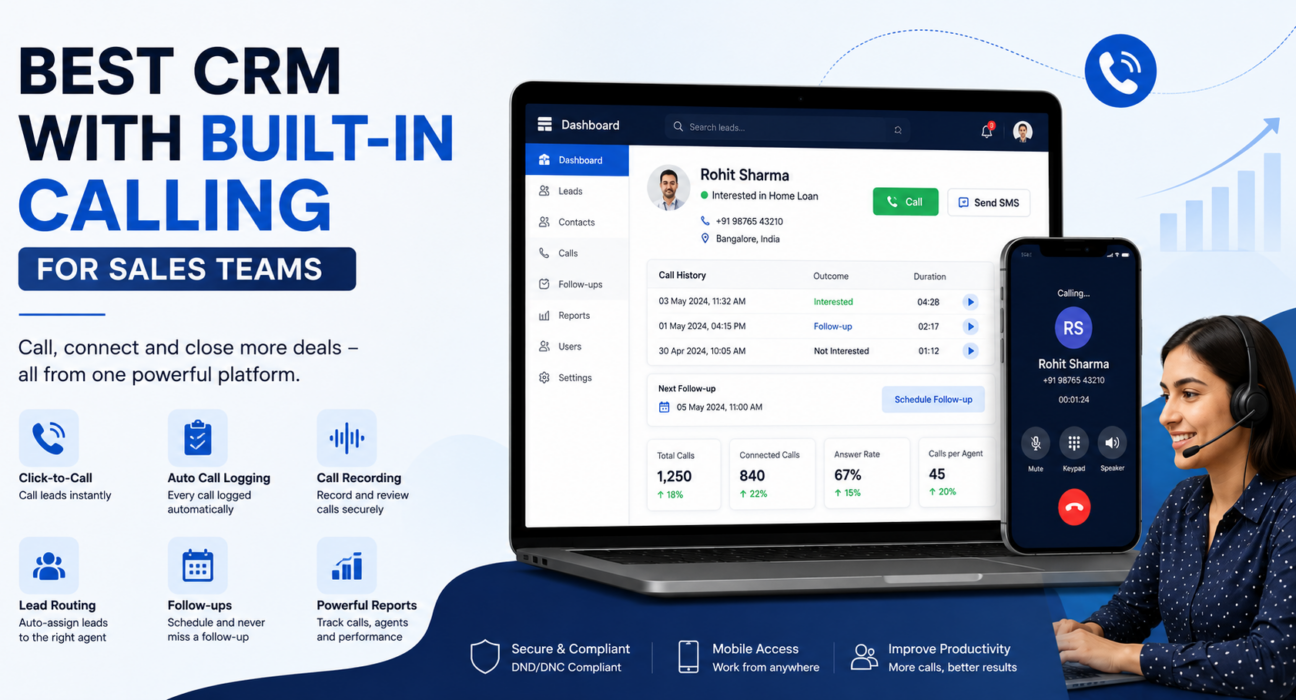
Best CRM with Built-In Calling for Sales Teams
Most sales teams don’t lose deals because they lack leads. They lose deals because nobody calls the lead on time. Follow-ups slip through the cracks, and nobody can say for sure which telecaller actually spoke to which prospect. A CRM with calling built in fixes this — it puts the phone and the customer record on the same screen, so calling and lead tracking stop being two separate jobs run on two separate habits. Before comparing prices between platforms, it’s worth looking closely at the calling and lead management features a CRM actually offers, not just what its homepage claims.
This guide explains what a CRM with built-in calling means, why it matters for sales and telecalling teams, which features make the real difference, and which mistakes to avoid when choosing one.
What Is a CRM with Built-In Calling?
A CRM with built-in calling is customer relationship management software that includes the calling function inside the same system you use to manage leads. Dialing, call logging, recording, and call history all live in one place. The agent doesn’t dial from a separate phone or app and then note the outcome by hand. They call directly from the lead’s record, and the system logs that call automatically.
This differs from a standard CRM, where calling either doesn’t exist or gets bolted on through a third-party integration. It also differs from calling-only software (a “dialer”), which handles calls but doesn’t track leads, pipeline stages, or follow-ups at all.
Why This Matters for Sales and Telecalling Teams
Teams that rely on outbound calling — real estate, education admissions, insurance, recruitment, loan sales, or B2B — depend on speed and consistency. A prospect who doesn’t hear back within minutes usually keeps comparing other options. Speed to call matters as much as the quality of the lead itself.
If you’ve managed a telecalling floor for even a few weeks, some of this will sound familiar. When calling and lead management sit in separate tools, the same problems keep showing up:
- Telecallers waste time switching between a phone, a spreadsheet, and a messaging app instead of talking to prospects.
- Managers can’t reliably see who called whom, when, or with what outcome.
- Follow-ups slip because no automatic reminder ties back to the call result.
- New leads sit unassigned, or two agents call the same prospect and confuse them.
- Nobody has a call recording or history to check what an agent actually promised a customer.
A CRM with built-in calling closes these gaps by keeping the call, the lead record, and the follow-up in one continuous workflow.
Key Features to Look for in a CRM with Calling
Not every “CRM with calling” offers the same depth — some just bolt a dial button onto a lead list. When you evaluate options, check for these features:
- Click-to-call or auto-dialing from the lead record. The agent shouldn’t need to leave the CRM or type a number manually to start a call.
- Automatic call logging. The system should capture call duration, outcome, and timestamp without manual entry.
- Call recording with controlled access. The system should store recordings securely and let admins review calls while agents typically hear only their own.
- Lead assignment and routing. The system should distribute new leads automatically, by round-robin, language match, or fixed ownership, instead of a manager assigning each one by hand.
- Follow-up scheduling tied to call outcomes. After an agent logs a call, the system should prompt or create the next follow-up on its own.
- Call history on every lead. Anyone who opens a lead record should immediately see every past call, note, and outcome.
- Reporting on calls, not just deals. Connection rate, answer rate, and calls per agent matter as much as revenue reports for a calling-heavy sales process.
- DND/DNC and calling-hours compliance. The system should help agents avoid Do Not Disturb numbers and calls outside permitted hours.
- Mobile access. Field agents and telecallers working outside the office need calling and lead updates from a phone, not just a desktop.
CRM with Calling vs. a Separate Dialer and CRM
Some businesses run a calling app and a CRM side by side instead of using one system. Here’s how the two approaches typically compare.
| Factor | CRM with Built-In Calling | Separate Dialer + Separate CRM |
|---|---|---|
| Call logging | Automatic, tied to the lead record | Manual, or needs syncing two tools |
| Follow-up tracking | Created from the call outcome automatically | Depends on agent discipline |
| Lead history | One timeline of calls, notes, and stage changes | Scattered across two systems |
| Reporting | One dashboard for calls and pipeline | Reports need manual combining |
| Setup and cost | One subscription, one login | Two subscriptions, two logins |
| Data accuracy | Lower risk of mismatched records | Higher risk of duplicate or missed entries |
A separate dialer isn’t always the wrong choice. Some large call centers use specialised dialing hardware for specific compliance or telephony needs. But for most sales and telecalling teams, one combined platform cuts manual work and closes data gaps.
Real-World Examples by Industry
These are illustrative examples of how teams typically use a CRM with calling. They are not case studies of a specific customer.
Real estate: A site-visit lead arrives from a property portal. The system assigns it to an available agent. The agent calls directly from the lead card and logs the outcome as “interested — schedule site visit.” The system then creates a follow-up reminder for the visit date on its own.
Education admissions counselling: A student submits an inquiry form for a course. The system routes the lead to a counsellor based on language preference. The counsellor calls to explain the course and fees, and the call outcome moves the lead from “inquiry” to “counselling done.”
Insurance: An agent calls a policy lead, and the system records the conversation for compliance and training. The agent logs the call with a note on which policy came up, so the next agent has full context during a handover.
Recruitment: A recruiter calls a candidate shortlisted from a job portal and logs interest level and availability. The CRM then schedules a follow-up call closer to the interview date automatically.
B2B sales: A sales rep calls a prospect from the pipeline view and logs the call as “demo scheduled.” The deal moves automatically to the next pipeline stage, with the demo date attached.
Benefits of Using a CRM with Built-In Calling
- Faster response to new leads. Agents call directly from where the lead appears, instead of exporting numbers or re-typing them.
- Fewer missed follow-ups. The system generates reminders from the call outcome, so nobody has to remember on their own.
- Clearer accountability. A manager can see exactly which agent called which lead, and what got discussed.
- Better coaching. Recordings and call history let a manager review real conversations rather than take an agent’s word for it.
- Simpler reporting. Call activity and pipeline movement sit in one system, not two reports that need combining by hand.
- Lower tool overhead. One login and one subscription replace the usual patchwork of a separate dialer and a separate CRM.
Common Mistakes When Choosing a CRM with Calling
Even experienced sales managers get tripped up by a few recurring mistakes here.
- Assuming “calling integration” means “built-in calling.” Some CRMs only connect to a third-party calling app, which usually means extra setup and less reliable data sync.
- Ignoring mobile calling needs. If telecallers or field agents work from phones, a desktop-only calling feature won’t get used consistently.
- Skipping compliance features. DND/DNC handling and calling-hours restrictions matter for high call volumes in India, where TRAI regulations apply to commercial calls.
- Overlooking follow-up automation. A CRM that logs calls but doesn’t help schedule the next action still leaves follow-ups to memory.
- Choosing on price alone. A cheap plan without call recording, lead routing, or reporting can cost more in lost leads than it saves in fees.
- Skipping a trial or demo. Call quality and ease of use are hard to judge from a features list. Test the system with a real lead list first.
Businesses unhappy with reporting gaps or setup complexity in their current tool may find it useful to read this broader guide on how to choose the best telecalling CRM for your business before switching.
How TeleCallingCRM Fits Into This
TeleCallingCRM builds calling and lead management into one system rather than treating them as separate tools. Its auto dialer works through assigned lead lists. The system logs each call automatically with duration and outcome, and it can create follow-ups straight from the call result instead of requiring manual entry. Recordings stay encrypted, and role-based playback means agents hear only their own calls while admins can review the whole team’s.
Lead assignment supports round-robin, language-based, and fixed-agent routing, and leads from sources like Facebook Ads, Google Ads, 99acres, and Housing.com can flow in directly. The platform also has a mobile app for field agents, plus industry-specific setups for sectors such as real estate, education, insurance, and recruitment.
This is one way to put the features above into practice. Teams should still weigh any CRM against their own call volumes, compliance needs, and team size before deciding.
Frequently Asked Questions
What is a CRM with calling?
A CRM with calling is customer relationship management software with phone calling built in. Agents dial, log, and track calls directly from a lead’s record instead of switching to a separate calling app.
Is a CRM with built-in calling the same as telecalling software?
They overlap. Telecalling software usually focuses on dialing and call handling. A CRM with built-in calling adds lead management, pipeline tracking, and follow-up automation around those calls in one system.
Do small sales teams need a CRM with calling, or just a CRM?
Any team that calls leads regularly benefits from built-in calling, even a small one. It removes manual call logging and helps ensure no follow-up gets missed. Call volume and process discipline matter more here than team size.
Is call recording in a CRM with calling legal in India?
Businesses should record calls with proper consent and sound data-handling practices, and follow applicable TRAI and data protection requirements. Rules can vary by use case, so confirm current requirements with a legal advisor rather than relying on software features alone.
Can telecallers use a CRM with calling from a mobile phone?
Many CRMs with built-in calling, including TeleCallingCRM, offer mobile apps. Telecallers and field agents can dial, log calls, and update leads without needing a desktop.
What’s the difference between an auto dialer and a CRM with calling?
An auto dialer usually handles only dialing and call queues. A CRM with calling adds lead management, pipeline stages, follow-up scheduling, and reporting, so calling activity connects directly to the sales process.
How do I know if a CRM’s calling feature is reliable enough for my team?
Test it with a real lead list before committing. Check call connection quality, how the system captures call logs, whether it creates follow-ups automatically, and how the mobile app performs. These are hard to judge from a features page alone.
Conclusion
Choosing between a CRM with calling and separate calling tools really comes down to one question: how much manual work is your team willing to accept between a phone call and an updated lead record? For most sales and telecalling teams, the answer is “as little as possible” — keeping calling, lead tracking, and follow-ups in one system means fewer missed leads and a clearer, more accurate picture of what’s actually happening on calls. If you want to see what this looks like in practice, TeleCallingCRM’s pricing and plans are a reasonable place to compare against whatever you’re using today.