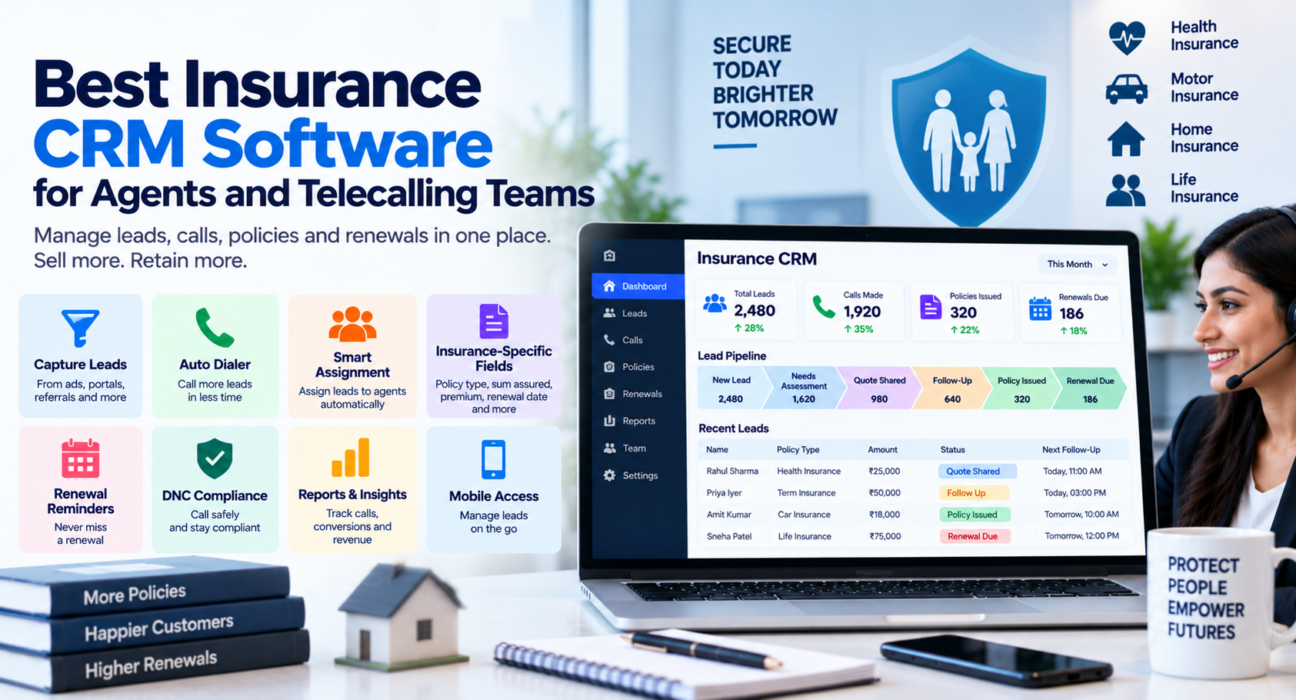
Best Insurance CRM Software for Agents and Telecalling Teams
Insurance selling runs on two things: fast follow-up and reliable renewal tracking. Miss either one, and you lose business you already had a fair shot at winning. This is exactly the gap that good insurance CRM software is built to close.
For agents and telecalling teams juggling leads from ads, portals, referrals and walk-ins, a spreadsheet or a diary is not enough once the team crosses a handful of agents. If you’re evaluating options, it helps to understand what a purpose-built insurance CRM actually needs to do before you compare vendors.
This article explains what insurance CRM software does, what to look for, common mistakes teams make, and how to decide if it’s the right time to adopt one.
What Is Insurance CRM Software?
Insurance CRM software is a system that helps insurance agents, POSPs, brokers and telecalling teams manage leads, track policy details, schedule renewal follow-ups, and monitor sales performance in one place.
Unlike a generic CRM, it is built around the insurance sales cycle: enquiry, needs assessment, quote sharing, policy issuance, and renewal. It typically also functions as telecalling software, since most insurance sales and retention work happens over the phone.
Why Insurance Selling Needs a Dedicated CRM
Insurance is not a one-call sale. A single client may need multiple touchpoints before they buy, and then they need to be contacted again — often a year later — for renewal. A few realities make this business especially dependent on organised follow-up:
- Leads come from many sources. Website forms, Facebook and Google ads, portals like JustDial, and referrals all generate enquiries that need to land in one place instead of scattered across notebooks and phone contacts.
- Renewals are recurring revenue, but only if someone remembers them. A policy that lapses because nobody called on time is a client — and commission — lost for no good reason.
- Multiple agents work the same lead pool. Without clear assignment rules, leads get called twice by different agents, or not at all.
- Performance needs to be visible. Managers need to know who is calling, who is converting, and where leads are getting stuck.
A telecaller CRM built for this workflow removes the manual tracking that causes these problems.
Core Features to Look For in Insurance CRM Software
When comparing tools, focus on features that map directly to how insurance is actually sold and renewed, not just generic CRM checkboxes.
1. Lead Capture and Assignment
Leads from ads, portals and web forms should flow into the system automatically, get de-duplicated, and get assigned to an agent without manual work. This is the foundation of any decent lead management software for insurance.
2. Insurance-Specific Lead Fields
Generic CRMs ask for name, number and email. Insurance selling needs more context on every lead, such as:
- Policy type (term, health, motor, life)
- Sum assured
- Premium amount
- Applicant age
- Existing policy details
- Renewal date
Capturing these fields at the point of the call means agents don’t have to hunt for context before they can help a client.
3. An Auto Dialer Built for Outbound Volume
Telecalling teams spend most of their working hours dialing. Sales calling software with an auto dialer moves agents from one lead to the next automatically, logs call duration from the phone, and skips DNC-listed numbers so agents don’t waste time or risk compliance issues.
4. A Pipeline That Matches the Insurance Sales Cycle
Instead of a generic “won/lost” pipeline, insurance selling benefits from stages such as: New Lead → Needs Assessment → Quote Shared → Follow-up → Policy Issued → Renewal Due → Lapsed/Lost. Seeing deal value tracked at each stage gives a realistic view of what’s actually going to close.
5. Renewal Follow-Up Automation
This is arguably the single most important feature for insurance specifically. Lead follow-up software that stores the renewal date and automatically schedules a reminder well before the lapse date turns renewals from a manual chase into a predictable process.
6. Team Visibility and Reporting
Managers need a live view of talk time, idle time, calls made, and conversions per agent — not a report they have to build in Excel every evening.
7. Mobile Access
Field agents and POSPs who aren’t at a desk all day need to call, log outcomes and check follow-ups from their phone.
Direct Answer: Do Insurance Agents Actually Need a CRM?
Yes, once a team has more than one or two agents or handles more than a handful of leads a day. Below that scale, a CRM may feel optional. Above it, tracking leads and renewals manually becomes the main reason deals and renewals get missed.
Real-World Scenarios (Hypothetical Examples)
These examples are illustrative, not real case studies.
Scenario 1 — A team of agents and POSPs: A small insurance agency has six agents selling term and health policies. Leads come from Facebook ads and referrals. Without assigned ownership, two agents sometimes call the same lead, and warm leads go cold because nobody follows up within a day. A shared pipeline with automatic lead assignment solves both problems.
Scenario 2 — A renewal-heavy book of business: A broker managing several hundred active policies across insurers needs to call clients 30–45 days before each renewal date. Tracking this manually in a spreadsheet works for a while, but as the book grows, dates get missed. Automated renewal reminders tied to the stored renewal date remove this risk.
Scenario 3 — A telecalling floor selling motor insurance: A team of 15 telecallers dials outbound leads all day. Managers want to know, in real time, who is idle, who is on a call, and how many quotes were shared today. A live dashboard view replaces end-of-day guesswork.
Benefits of Using Insurance CRM Software
| Benefit | What It Solves |
|---|---|
| Centralised lead capture | Leads no longer sit in someone’s WhatsApp or personal notebook |
| Automated lead assignment | Removes duplicate calling and unclaimed leads |
| Renewal reminders | Prevents policy lapses due to missed follow-up |
| Call tracking | Gives a record of every conversation and outcome |
| Team reporting | Shows managers where leads are stuck and who needs support |
| Mobile access | Keeps field agents and POSPs productive outside the office |
Common Mistakes Insurance Teams Make
- Treating renewals as an afterthought. Renewal revenue is often easier to close than new business, but only if the reminder happens on time.
- Not tagging leads with policy details. Without policy type, premium and sum assured on record, every follow-up call starts from zero.
- Ignoring DNC compliance. Calling numbers on the Do Not Call registry creates compliance risk; this should be handled automatically, not left to agent memory.
- Choosing a generic CRM instead of one built for calling. A CRM without a built-in dialer and call logging adds extra manual work instead of removing it.
- Not reviewing agent-level performance. Without visibility into call volume and conversion by agent, coaching and target-setting become guesswork.
What to Consider Before Choosing a Provider
Before selecting insurance CRM software, it helps to check:
- Does it support insurance-specific pipeline stages and lead fields, or will you need heavy customisation?
- Does it include an auto dialer, or will you need a separate dialing tool?
- Can it store renewal dates and automate reminders?
- Is pricing per user or flat per team, and does it fit your team size as you grow?
- Does it have a mobile app for field agents?
- Can leads from your existing lead sources (ads, portals, website) be connected without manual export-import?
How TeleCallingCRM Supports Insurance Teams
TeleCallingCRM offers an insurance-specific setup that includes a tailored pipeline (New Lead, Needs Assessment, Quote Shared, Follow-up, Policy Issued, Renewal Due, Lapsed/Lost) along with insurance-specific lead fields such as policy type, sum assured, premium, age, existing policy and renewal date.
It connects to common lead sources such as website forms, Facebook and Google ads, JustDial and referrals, and includes a sequential auto dialer, one-tap call outcomes, DNC skipping, follow-up scheduling and reminders, a live team dashboard, and an Android and iOS mobile app. Every plan includes the same core feature set, with plans starting at a flat monthly rate rather than per-user pricing.
This kind of CRM for telecallers is built specifically so renewal dates and quote follow-ups stay visible to the agent handling them, rather than depending on memory or a personal notebook.
Frequently Asked Questions
What is the best insurance CRM software for a small team?
For a small team of a few agents, look for CRM for telecallers that includes lead assignment, an auto dialer, and renewal reminders in an affordable flat-rate plan, rather than paying per user for basic features.
Can insurance CRM software remind me about policy renewals?
Yes, most insurance-focused CRMs let you store a renewal date on each lead or policy and automatically schedule a follow-up reminder before it lapses.
Do I need an auto dialer if I already have a phone?
An auto dialer isn’t mandatory, but it significantly reduces manual dialing time and automatically logs call duration and outcomes, which manual dialing does not.
Is insurance CRM software useful for POSPs and individual agents, or only agencies?
It’s useful for both. Even a single agent managing dozens of live prospects and hundreds of renewal dates benefits from automated reminders and organised lead tracking.
How is a telecaller CRM different from a regular CRM?
A telecaller CRM is built around outbound calling as the core workflow, with features like auto dialers, call logging and DNC compliance built in, rather than being an add-on.
What insurance-specific data should a CRM capture on each lead?
At minimum: policy type, sum assured, premium, applicant age, existing policy details, renewal date, and lead source.
Can a CRM handle leads from multiple sources like ads and portals?
Yes, most insurance CRMs support integrations with ad platforms, property or insurance portals, and website forms so leads land automatically instead of requiring manual entry.
Is mobile access important for insurance agents?
Yes, especially for POSPs and field agents who need to call, log outcomes and check follow-ups without being tied to a desk.
Conclusion
Insurance selling depends on speed to first contact and discipline around renewals — two things that break down quickly once a team relies on spreadsheets or memory. The right insurance CRM software removes that risk by keeping leads organised, follow-ups scheduled, and renewal dates visible before they lapse.
If you’re comparing options for your team, it’s worth reviewing how TeleCallingCRM’s insurance CRM handles lead assignment, renewal tracking and auto dialing before deciding what fits your workflow.