TeleCalling CRM for Insurance Agents and Loan Consultants
Telecalling CRM for insurance helps agents and advisers capture every lead, call it quickly and keep following up until the policy is issued or the renewal is done. The same approach works for loan consultants and DSAs, who also depend on calls, documents and timely reminders. A single missed callback or forgotten renewal date can mean a lost client.
This guide explains how insurance agents and loan consultants can manage leads and follow-ups with a calling CRM. If you want to see how one works, a calling CRM built for Indian sales teams is a useful reference.
Disclosure: this blog is published by TeleCalling CRM. We mention our own product where relevant, but the guidance applies to any good tool.
What Is Telecalling CRM for Insurance?
Telecalling CRM for insurance is software that helps agents and advisers capture leads, call them, log outcomes and schedule follow-ups and renewal reminders in one system. It keeps each prospect’s policy interest, call history and next step together, instead of scattered sheets, diaries and WhatsApp chats.
It suits individual agents, agency teams, brokers’ calling teams and loan consultants who sell mainly over the phone.
Where Insurance Agents and Loan Consultants Lose Leads
Most losses happen in the same places:
- Missed renewal dates: the client is contacted too late, or not at all.
- Scattered leads: enquiries come from ads, aggregators, referrals and old lists, and land in different files.
- Forgotten callbacks: “call me next week” is never noted anywhere.
- No record of what was explained: disputes about what was promised are hard to settle.
- Pending documents: nobody tracks who still owes which paper.
- Data on personal phones: when an agent leaves, the client history leaves too.
- Cold-calling without checks: numbers on the Do Not Call list are dialled by mistake.
A calling CRM reduces each of these, if the team follows clear rules.
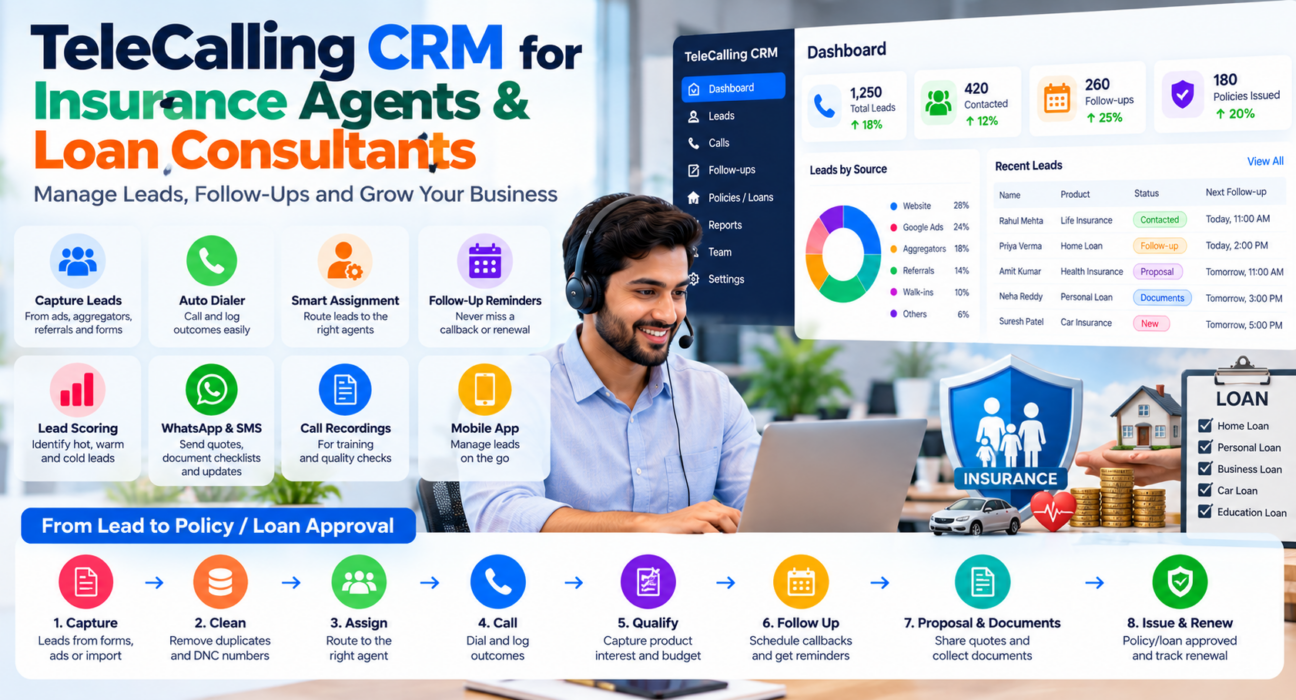
How Telecalling CRM for Insurance Works: From Lead to Policy
| Stage | What happens | What the CRM does |
|---|---|---|
| Capture | Lead arrives by import, form or ad | Records the lead with its source |
| Clean | Duplicates and DNC numbers are flagged | De-duplication and DNC checks |
| Assign | The lead goes to an agent | Round-robin, language or fixed-owner rules |
| Call | The agent dials and talks | Auto dialer, call duration and outcome logging |
| Qualify | Age, family details, existing cover and budget are noted | Custom fields, tags and lead scoring |
| Follow up | Callbacks are scheduled | Reminders and overdue alerts |
| Proposal and documents | Quote is shared, documents collected | Stage update and reminders |
| Issue and renew | Policy is issued, renewal date is tracked | Follow-up set before the renewal date |
Features of Telecalling CRM for Insurance
- Multi-source capture: CSV or Excel import, forms and ad integrations reduce manual uploads. See the integration setup guides.
- Duplicate and DNC handling: the same person becomes one lead, and Do Not Call numbers are flagged.
- Assignment rules: route leads by language, product line or round-robin.
- Lead scoring and priority: hot, warm and cold labels help agents call serious prospects first.
- Custom fields and tags: record age, existing cover, premium budget, policy type and renewal date.
- Auto dialer and call logging: move through a call queue and log each outcome in one tap.
- Call scripts: keep product explanations consistent across the team.
- Follow-up reminders: one-tap callbacks with overdue alerts.
- Messaging: send brochures, quotes and document checklists by WhatsApp, SMS or email, and keep them on the client’s timeline.
- Call recording: useful for training and for settling doubts about what was said.
- Mobile app: log calls and check follow-ups away from the desk.
Renewal Follow-Ups With Telecalling CRM for Insurance
Renewals are among the easiest sales to lose, because they depend on timing. The simplest method is to record the renewal date in a custom field and schedule a follow-up before it.
This is a hypothetical example plan. Adjust it to your products and client preferences.
- About a month before: call to remind the client and check if anything has changed.
- Two weeks before: follow up if there is no response, and share the renewal details by WhatsApp.
- A week before: confirm payment and answer questions.
- After renewal: note the new date and schedule next year’s reminder.
The website lists custom fields and follow-up scheduling, so confirm that date fields and reminders work the way you need before relying on them.
Using a Calling CRM as a Loan Consultant or DSA
Loan sales have longer steps than a simple call. A prospect must share documents, pass eligibility checks and wait for the lender. A calling CRM helps by keeping each case visible.
One simple pipeline:
- New enquiry
- Contacted
- Eligibility discussed: loan type, amount, income and city noted
- Documents requested
- Documents received
- Submitted to lender
- Sanctioned
- Disbursed
- Lost: with a reason, such as rate, eligibility or chose another lender
Use reminders for pending documents, and record which lender each case is with. Never promise approval or rates in a call, and follow your lender’s and principal’s policies.
How to Set Up Telecalling CRM for Insurance
- Clean your lead data. Remove duplicates and invalid numbers before importing.
- Connect your sources. Link the forms, ad accounts and portals you use.
- Define stages and call outcomes. Use a short list: interested, call back, not interested, wrong number and not reachable.
- Create custom fields. Add policy type, budget, renewal date, or loan type and amount.
- Set assignment rules. Decide who gets which leads by product, language or round-robin.
- Train agents and review weekly. Check overdue follow-ups, pending documents and lost reasons, then adjust.
Metrics to Track
| Metric | What it shows |
|---|---|
| First response time | How fast new leads are called |
| Connection rate | How many calls reach a person |
| Follow-up completion | Whether promised callbacks happen |
| Renewal contact rate | Renewals contacted before the due date |
| Proposal or quote rate | Prospects who reach the quote stage |
| Document turnaround | Time taken to collect pending documents |
| Source-wise conversion | Which channels bring real clients |
| Lost reasons | Why prospects drop out |
Compare these with your own baseline, not generic benchmarks. For dashboards and live monitoring, read our post on the live war room and reports.
Compliance and Data Handling
Insurance and lending are regulated sectors, and client data is sensitive. Keep these points in mind:
- Calling rules: India’s TRAI rules are set out in the Telecom Commercial Communications Customer Preference Regulations, 2018. A CRM can help with DNC and calling-hour controls, but compliance remains your responsibility.
- Data protection: the Digital Personal Data Protection Act, 2023 applies to personal data, with rules notified in November 2025 and an 18-month phased timeline, as the Press Information Bureau explains.
- Sector rules: insurers and lenders have their own conduct and recording requirements. Check the rules of your principal, insurer or lender, and take advice from a compliance professional.
- Access control: let agents see only the clients they handle, and limit who can export data.
Common Mistakes to Avoid
- No renewal tracking: renewals depend on dates, not memory.
- Too many stages: agents stop updating them and reports lose meaning.
- Importing dirty data: duplicates and wrong numbers waste time.
- Ignoring DNC: unwanted calls damage trust and may breach rules.
- Over-promising: never guarantee returns, claims or loan approvals.
- No training: a CRM works only if every call is logged.
How TeleCalling CRM Fits Insurance and Loan Teams
Based on its website, TeleCalling CRM is built for outbound sales teams in India. It lists:
- A smart auto dialer with call duration capture and one-tap outcome logging
- Lead import, de-duplication, DNC checks and rule-based assignment
- Hot, warm and cold scoring, tags, custom fields, capture forms and call scripts
- Follow-up scheduling with reminders and overdue alerts
- 12+ lead-source integrations, including Facebook and Instagram Lead Ads and Google Ads
- SMS, email and WhatsApp messaging, encrypted call recording with access levels, and AI call analysis
- A sales pipeline with custom stages, source performance and agent comparison reports
- A live war room and an Android and iOS app
Per its pricing page, Basic is ₹999 per month for up to 5 users and Pro is ₹1,599 per month for up to 10 users, excluding GST. The website also mentions a 3-day free trial. Review the features page against your needs.
Policy administration, premium calculators, quote engines and loan eligibility tools are not listed, so confirm with the team if you need them. You can also read our industry page for policy sales teams, our page for loan and DSA teams and our guide on what policy sales teams gain from calling software. For a buying process, see our selection checklist.
FAQs: Telecalling CRM for Insurance
What does a telecalling CRM do for insurance agents?
It captures leads, supports calling, logs outcomes and schedules follow-ups and renewal reminders. Each client has one record with call history, notes and the next step.
Can small agents use telecalling CRM for insurance?
Yes. Even a single agent with a few hundred leads and renewals can miss dates and callbacks. Choose a tool with simple setup, a mobile app and clear pricing.
Is telecalling CRM for insurance useful for loan consultants too?
Yes, the workflow is similar: capture, call, qualify, follow up and track documents. Loan teams usually need extra pipeline stages for documents, lender submission and sanction.
How can I manage renewal reminders in a calling CRM?
Record the renewal date in a custom field and schedule follow-ups before it. Check that your chosen tool supports date fields and reminders in the way you need.
Does it help with DND and TRAI compliance?
It can help through DNC list checks and calling-hour controls, but it cannot guarantee compliance. Review TRAI’s current rules and take professional advice where needed.
Does a calling CRM include policy or loan management?
Not always. Many calling CRMs focus on leads, calls and follow-ups, not policy administration or loan processing. If you need those, check with each vendor.
Does a CRM guarantee more sales?
No. It supports faster response, consistent follow-ups and better records, but sales also depend on product fit, pricing, trust and agent skills.
Conclusion
Insurance and loan sales depend on timing, trust and records. A calling CRM gives every lead an owner, every call a record and every renewal or pending document a reminder, so clients are not lost between sheets, diaries and phones.
If you want to test this with your own leads and renewals, you can review the monthly plans and free trial and run a short pilot with two or three agents.