Field Staff Attendance App: How to Track Attendance & Location
If your field team marks attendance from wherever they happen to be — or not at all — you already know the problem. Spreadsheets get outdated within hours, manual check-ins are easy to fake, and by the time payroll runs, nobody is fully sure who actually visited which site on which day.
A field staff attendance app solves this by combining attendance marking with real-time location data, so businesses know not just when an employee clocked in, but where they were when they did it.
In this article, we’ll cover how these apps work, why GPS and geofencing matter, what to look for before choosing one, and how field force management platforms like FieldExecutives fit into the picture.
What Is a Field Staff Attendance App?
A field staff attendance app is a mobile-first tool that lets employees who work outside a fixed office — sales reps, service technicians, delivery staff, auditors, collection agents — mark their attendance directly from their smartphone, with the app capturing their GPS location at the time of check-in and check-out.
Unlike traditional biometric attendance systems, which require employees to be physically present at a fixed device, a field attendance app works from any location, which is essential for teams that rarely visit a central office.
At its core, the app typically records:
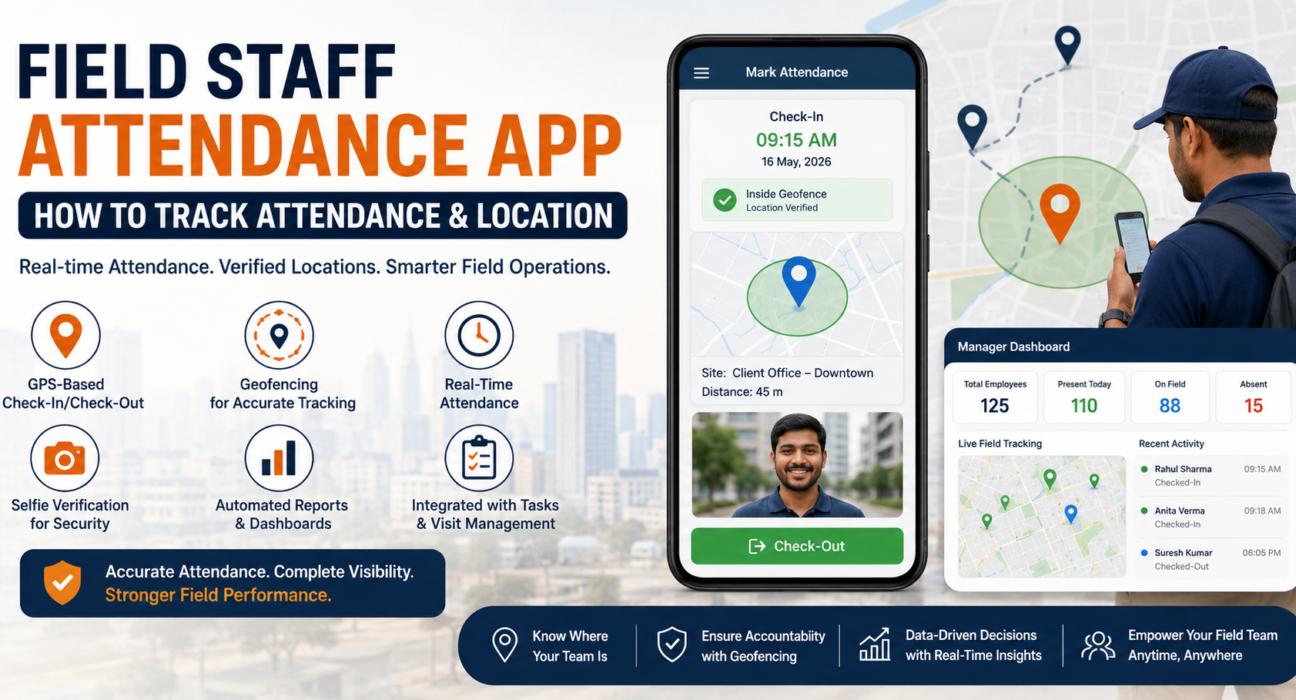
- Check-in and check-out time
- GPS coordinates at the time of marking attendance
- Photo or selfie verification (in many apps)
- Distance from the assigned work location or client site
This combination of time and location data gives managers a far more reliable picture of field activity than a manual register or a simple time-tracking app ever could.
Why Traditional Attendance Methods Fail for Field Teams
Office-based attendance systems assume employees show up to one location. Field operations break that assumption entirely. A few common failure points:
1. No Way to Verify Location
A phone call or a manually filled register tells you someone claims to be at a site — it doesn’t confirm it. Managers are left trusting self-reported updates with no way to cross-check them.
2. Delayed Visibility
By the time attendance sheets are consolidated, reviewed, and shared, the information is often a day or more old. That’s too slow for operations that need to react in real time, like reassigning a technician or following up on a missed customer visit.
3. Manual Errors and Disputes
Paper logs and spreadsheet entries are prone to mistakes, and disputes over actual work hours or visit counts are common when there’s no objective record.
4. Difficulty Scaling
Manual tracking might work for five field employees. It becomes unmanageable at fifty or five hundred, spread across multiple cities.
These gaps are exactly why businesses managing distributed field teams — in sales, service, distribution, or field audits — are moving toward dedicated attendance and tracking software.
How GPS Tracking Works in a Field Attendance App
GPS (Global Positioning System) tracking is the foundation of any field staff attendance app. When an employee opens the app to mark attendance, the app requests location access from the device and records latitude and longitude coordinates at that exact moment.
This location data is then tied to the attendance entry, so managers can see:
- Where the employee was when they checked in
- Whether that location matches the assigned site or territory
- The employee’s movement pattern throughout the day (in apps with continuous tracking)
Some platforms extend this into live tracking, where field managers can view employee locations on a map in real time throughout the workday, not just at check-in and check-out.
What Is Geofencing, and Why Does It Matter for Attendance?
Geofencing is a feature that creates a virtual boundary around a specific physical location — a client site, warehouse, or service area — using GPS or RFID technology.
With geofencing enabled, an attendance app can:
- Restrict attendance marking to within a defined radius of the assigned location
- Automatically flag check-ins that occur outside the boundary
- Trigger alerts when an employee enters or exits a geofenced zone
This is particularly useful for businesses that need proof that field staff physically visited a customer site — not just that they were “somewhere” at check-in time. For field sales teams and service technicians, geofencing turns attendance from a formality into a verifiable record of actual visits.
Key Features to Look For in a Field Staff Attendance App
Not every attendance app is built for field operations. When evaluating options, look for the following capabilities:
| Feature | Why It Matters |
|---|---|
| GPS-based check-in/check-out | Confirms location at the moment of attendance |
| Geofencing | Restricts or flags attendance outside defined zones |
| Real-time location tracking | Gives managers live visibility into field movement |
| Selfie or photo verification | Adds an extra layer of identity confirmation |
| Offline mode | Ensures attendance can be marked in low-connectivity areas and syncs later |
| Automated reports | Removes manual consolidation of attendance data |
| Leave and shift management | Handles attendance alongside leave requests and shift planning |
| Integration with task/visit management | Connects attendance to actual field activity, not just clock-in time |
A tool that combines these with broader field force management — task assignment, route planning, and reporting — tends to offer more long-term value than a standalone attendance app.
Step-by-Step: How Field Staff Attendance Tracking Works in Practice
- Employee opens the app at the start of the workday and marks check-in.
- The app captures GPS location and, depending on configuration, a verification photo.
- The system checks the location against any assigned geofence or expected work area.
- Attendance data is logged in real time and becomes visible to the manager or admin dashboard.
- Throughout the day, the app may continue capturing location data for live tracking or site-visit verification.
- At day’s end, the employee marks check-out, again with location capture.
- Reports are auto-generated, summarizing attendance, working hours, and location compliance — ready for payroll or performance review.
This flow removes the manual back-and-forth of collecting attendance data from multiple field employees individually.
Benefits of Using a Field Staff Attendance App
- Accurate, verifiable attendance data instead of self-reported entries
- Real-time visibility into where field teams are during work hours
- Reduced attendance disputes, since location and time stamps are objective
- Faster payroll processing, with attendance data ready without manual consolidation
- Better accountability for field visits, especially when paired with geofencing
- Easier scaling as field teams grow across regions
Common Challenges Businesses Face — and How to Address Them
Employee resistance to location tracking. Field staff sometimes view GPS tracking as surveillance. Clear communication about why tracking exists — accurate attendance, safety, fair evaluation — and transparency about what data is collected (typically only during work hours) helps address this.
Battery and connectivity issues. Continuous GPS tracking can drain phone batteries, and field areas often have poor network coverage. Apps with offline mode and optimized location-polling intervals help minimize this.
Inconsistent adoption across teams. Rolling out a new app across a large field workforce takes structured onboarding. Simple, intuitive interfaces and manager-led training improve adoption rates significantly.
Data overload for managers. Raw GPS logs aren’t useful without summarization. Automated dashboards and exception-based alerts (like “outside geofence” flags) are more actionable than raw location dumps.
Businesses looking to simplify these processes can use field force management software such as FieldExecutives, which combines GPS-based attendance, geofencing, and real-time reporting within a single platform built specifically for managing distributed field teams. [Internal Link Opportunity: FieldExecutives — Field Attendance Tracking feature page]
How FieldExecutives Supports Field Attendance and Location Tracking
FieldExecutives is built for businesses managing field sales, service, and operations teams that don’t work from a fixed office. Within the platform, attendance tracking is connected directly to location data, so check-ins are backed by verifiable GPS coordinates rather than manual entries.
Relevant capabilities include:
- GPS-based attendance marking for accurate check-in and check-out records [Internal Link Opportunity: FieldExecutives — GPS Tracking feature page]
- Geofencing to confirm employees are marking attendance within assigned zones [Internal Link Opportunity: FieldExecutives — Geofencing feature page]
- Real-time reporting dashboards for managers to monitor attendance and field activity as it happens [Internal Link Opportunity: FieldExecutives — Real-Time Reporting page]
- Integration with task and visit management, so attendance connects to actual field work, not just clock-in time [Internal Link Opportunity: FieldExecutives — Task Management feature page]
Because attendance, location, and field activity data sit in one system, managers get a consolidated view instead of piecing together information from multiple disconnected tools. [Internal Link Opportunity: FieldExecutives — Book a Demo page]
Best Practices for Rolling Out a Field Attendance App
- Set clear geofence boundaries based on realistic site radii — too tight, and legitimate check-ins get flagged; too loose, and the boundary loses meaning.
- Communicate the purpose of location tracking to field staff before rollout.
- Start with a pilot team before a full rollout, to catch configuration issues early.
- Review reports weekly, not just at month-end, to catch attendance or location anomalies early.
- Pair attendance data with visit or task data for a fuller picture of field productivity, not attendance in isolation.
Conclusion
Manual attendance tracking simply wasn’t built for teams that work outside a fixed office. Without location data, businesses are left trusting self-reported check-ins, dealing with delayed reports, and struggling to verify whether field visits actually happened as claimed.
A field staff attendance app fixes this by tying attendance directly to GPS location, so every check-in comes with proof of where and when it happened. Add geofencing, real-time dashboards, and automated reporting, and attendance stops being a monthly headache and becomes a reliable, always-current record.
For businesses managing distributed sales, service, or operations teams, this shift isn’t just about attendance accuracy — it’s about having real visibility into field operations as they happen. Platforms like FieldExecutives bring attendance, location tracking, and field activity together in one place, so managers spend less time chasing data and more time acting on it.
If inconsistent attendance records or lack of field visibility are slowing your team down, it’s worth seeing how a purpose-built field staff attendance app can help.