Offline Field Service App: What Happens With No Internet?
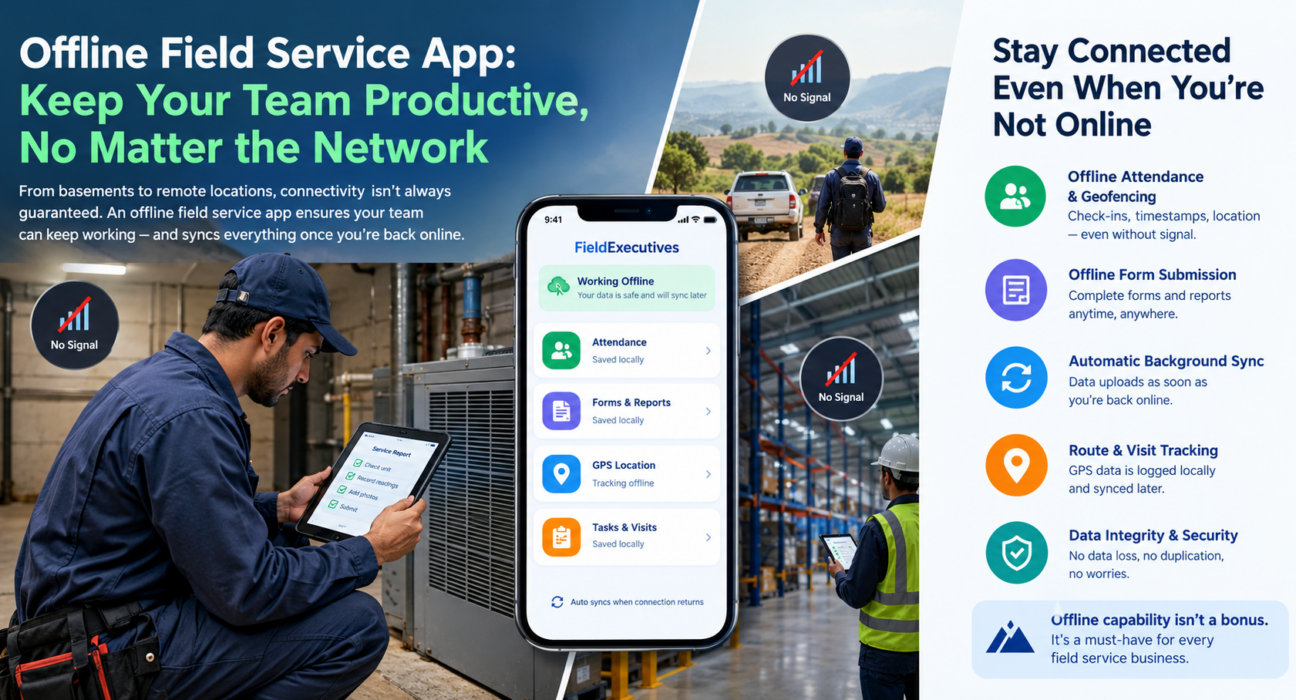
A field executive walks into a basement to service an HVAC unit. No signal. A sales rep drives through a rural stretch to visit a distributor. No signal. A technician enters a steel-frame warehouse for an inspection. No signal, again.
These aren’t edge cases. They’re a normal part of field operations. Yet many field service platforms quietly assume a network connection is always available. When that assumption breaks, the app breaks too: forms won’t submit, attendance won’t mark, GPS location stops updating, and technicians end up jotting notes on paper to enter later.
This is exactly the problem an offline field service app solves. In this article, we’ll look at what actually happens when field apps lose connectivity, why offline capability matters more than most buyers realize, and what to check for in a platform that keeps field operations running no matter the network conditions.
What Is an Offline Field Service App?
An offline field service app lets field employees keep working — logging attendance, submitting forms, recording visits, tracking location — even without an active internet connection. The app stores data locally on the device and syncs it to the central server automatically once connectivity returns.
The core idea is simple: connectivity should support the workflow, not gate it. A well-built offline system treats the internet as something that syncs data, not something the operation depends on minute to minute.
Why Field Teams Frequently Lose Connectivity
Field operations happen outside controlled office environments. Several everyday scenarios routinely disrupt network access:
- Rural and semi-urban territories — Sales and service visits in Tier 2/3 towns or agricultural belts often fall outside strong 4G/5G coverage.
- Indoor and underground locations — Basements, warehouses, cold storage units, and metal-structured buildings block or weaken signal.
- Remote infrastructure sites — Telecom towers, solar installations, pipelines, and construction sites often sit far from network towers.
- Network congestion — Crowded areas can throttle data speeds during peak hours, even where coverage technically exists.
- International or cross-border travel — Field staff moving across regions may face roaming restrictions or unstable local networks.
- Device or carrier issues — SIM problems, expired data plans, or device settings can cause drops unrelated to actual coverage.
A field force management strategy has to account for these gaps. It can’t assume they won’t happen.
What Happens Without Offline Support
When a field service app has no offline capability, connectivity loss doesn’t just pause the app. It creates operational and data risk. Here’s what typically goes wrong:
1. Attendance and Check-Ins Fail to Register
Geofenced attendance and visit check-ins usually need a live connection to timestamp and verify location. Without offline support, a technician who arrives on-site with no signal simply can’t mark attendance. This distorts productivity reports and can affect payroll accuracy.
2. Forms and Reports Are Lost or Delayed
Custom forms, inspection checklists, and service reports filled out mid-visit may fail to submit. Employees then have to wait, restart later, or fall back to paper — reintroducing the exact inefficiency the software was meant to eliminate.
3. GPS Tracking Shows Gaps
Live location tracking needs continuous data transmission. Without offline buffering, managers see blank stretches on the tracking map. That makes it harder to verify routes, visit durations, or field presence.
4. Data Entry Duplication
Employees who revert to notebooks or phone notes during outages have to manually re-enter that data later. This doubles their effort and raises the chance of transcription errors.
5. Delayed Decision-Making
Sales and operations managers rely on real-time reporting to make same-day decisions: reassigning tasks, escalating SLA breaches, approving expenses. Connectivity gaps delay these decisions, sometimes by hours.
How Offline Field Service Apps Actually Work
Offline functionality isn’t a single feature. It’s a design approach built on a few technical foundations:
| Component | Function |
|---|---|
| Local data storage | The app stores form entries, attendance, GPS pings, and task updates directly on the device when offline. |
| Background sync engine | The app uploads stored data to the server automatically and silently once connectivity returns. |
| Conflict resolution logic | If someone edits the same record both offline and centrally, the system applies rules to reconcile the data without loss or duplication. |
| GPS buffering | The app logs location coordinates locally at intervals and pushes them to the server as a batch once the device reconnects. |
| Low-bandwidth sync mode | On a weak signal, the app prioritizes syncing lightweight data like text and coordinates before larger files like photos. |
The result: field employees see little to no disruption in their day-to-day workflow. Managers get complete, accurate data once the device comes back online, not a fragmented version of it.
Key Features to Look for in an Offline Field Service App
If offline capability is a requirement for your business, and for most field-heavy industries it should be, evaluate platforms against these criteria:
- Offline attendance and geofencing — The app should record check-ins locally and timestamp them accurately even without live GPS validation, then sync once reconnected.
- Offline form submission — Custom forms and workflows should work fully offline, with no fields locked or disabled due to connectivity.
- Automatic background sync — The app should upload data automatically the moment signal returns, without the employee retrying manually.
- Route and visit tracking continuity — GPS tracking should log offline movement and fill in the tracking map retroactively instead of leaving blank segments.
- Data integrity safeguards — The system should prevent data loss, duplication, or overwrites when multiple offline entries sync at once.
- Minimal storage footprint — The app should stay lightweight enough to store offline data without draining device storage or battery.
- Sync status visibility — Both the employee and the manager should see what’s synced, what’s pending, and when the last sync happened.
Best Practices for Managing Field Teams in Low-Connectivity Areas
Even with a capable offline field service app, a few operational habits improve reliability further:
- Brief field staff on offline mode so they know the app still works correctly even without a visible connection indicator.
- Encourage periodic manual syncs when staff pass through better-covered areas, instead of relying on automatic background sync alone.
- Monitor sync logs regularly to catch devices that haven’t synced in an unusually long time. This can flag both connectivity issues and device problems.
- Plan routes with connectivity in mind where possible, especially for time-sensitive tasks like SLA-bound service visits.
- Keep the app and OS updated, since sync stability often improves with software updates.
How FieldExecutives Supports Offline Field Operations
Businesses looking to simplify these processes can use field force management software such as FieldExecutives, which is built to keep field teams productive even in low or no-connectivity zones. The app stores attendance, task updates, and field visit data securely on the device when offline, then syncs it automatically once the connection returns. Managers don’t end up with incomplete reporting or delayed visibility into field activity.
This matters across the workflows field teams rely on daily, including [Internal Link Opportunity: Field Employee Tracking page], [Internal Link Opportunity: Field Attendance & Geofencing page], and [Internal Link Opportunity: Custom Forms and Workflows page]. FieldExecutives designed all three to function reliably regardless of network conditions in the field.
For teams managing sales visits, service calls, or distributed field operations across varied terrain, this kind of resilience isn’t a convenience. It’s a basic operational requirement.
Conclusion: Don’t Let Connectivity Decide Your Field Team’s Productivity
Network gaps are a normal part of field work, not an exception to plan around occasionally. Basements, rural routes, warehouses, and remote sites will keep interrupting signal. The real question is whether your field service software keeps working anyway.
An offline field service app removes that dependency. It captures attendance, forms, visit data, and GPS activity locally, then syncs everything automatically the moment connectivity returns. That means fewer data gaps, less duplicate entry, and more accurate real-time reporting for managers, regardless of where the field team happens to be standing.
Businesses evaluating field force management software should treat offline capability as a core requirement, not a bonus. Platforms like FieldExecutives are built around this reality, helping field teams stay productive whether they’re in full network coverage or completely off the grid.