Best CRM for Sales Lead Management in India
Every business that sells has the same quiet problem: leads arrive faster than the team can organise them. Some get called within minutes, some after two days, and some never. Often the cause is not the agents. It is the lack of one system that shows who the lead is, who owns it and what happens next.
This guide explains how to choose sales lead management software that fits Indian sales teams, including the features that matter, the stages a lead should move through and the mistakes to avoid. If your team sells mainly by phone, lead management software built for calling teams can combine lead capture, calling and follow-ups in one place.
What Is the Best CRM for Sales Lead Management in India?
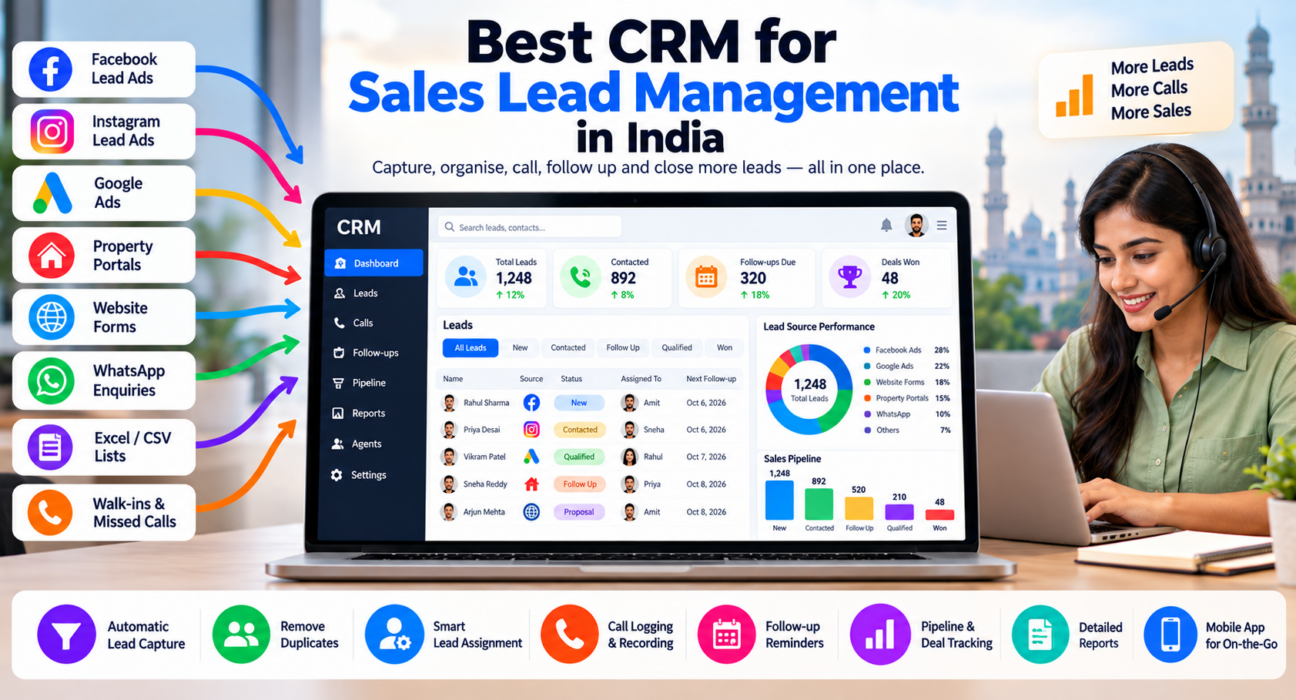
The best CRM for sales lead management in India captures leads automatically from the sources you use, removes duplicates, assigns each lead to an agent, records every call and note, and reminds agents to follow up. It should also be easy to learn, clearly priced and supported in India.
There is no single winner for every business. A real estate team, a coaching institute and a B2B services firm have different lead types and sales cycles. The right choice depends on how your leads arrive and how your team sells.
What Is Sales Lead Management Software?
Sales lead management software is a tool that helps businesses capture, organise, assign, track and follow up on sales leads from first enquiry to closed deal. It keeps lead details, call history and next actions in one shared place so no lead is forgotten.
Many CRMs include lead management. The difference is focus. A general CRM may centre on accounts and deals. Lead management software centres on what happens to each new enquiry in the first hours and days, when most leads are won or lost.
Why Lead Management Matters
Leads cost money. You pay for ads, portal subscriptions, event stalls or purchased data. If the lead is not followed up, that spending is wasted.
Good lead management helps you:
- Respond to new leads faster
- Avoid duplicate calls and conflicting messages
- Keep a full history of every conversation
- Spot leads that have gone quiet
- Compare lead sources by results, not just volume
- Reduce dependence on any single agent’s memory
The Lead Lifecycle: What the Software Must Handle
A useful way to judge software is to follow a lead from start to finish.
| Stage | What should happen | What the software should do |
|---|---|---|
| Capture | Lead enquires through an ad, portal or form | Pull it in automatically |
| Clean | Duplicates and wrong numbers are removed | Detect duplicates, check DNC lists |
| Assign | Lead goes to the right agent | Route by rules such as source, city or language |
| Contact | Agent makes the first call | Log the call, duration, outcome and notes |
| Follow up | Agent calls back as promised | Remind, and alert when overdue |
| Progress | Lead moves through stages | Track pipeline stages and deal value |
| Close | Deal is won or lost | Record result and reason |
| Review | Manager checks what worked | Report by agent and source |
If a tool is weak at any stage, your team will fill the gap with spreadsheets or WhatsApp, which brings the original problem back.
Key Features to Look For
Automatic lead capture
Manual entry is slow and error-prone. Look for direct connections to the sources you use, such as Facebook and Instagram lead forms, Google Ads, property portals, JustDial, your website and Google Sheets.
Duplicate detection
The same person often enquires through two channels. Without duplicate checks, two agents call them, which looks unprofessional and wastes time.
Lead assignment rules
Leads should be distributed by clear rules. For example, by city, product, language or round-robin. This avoids arguments about who gets the best leads and speeds up the first call.
Lead scoring or prioritisation
Not every lead is equally ready to buy. Scoring or priority tags help agents call warmer leads first, especially when volume is high.
Call logging and notes
For phone-driven teams, calls are the main activity. The software should record duration, outcome, notes and, where permitted, call recordings against the lead.
Follow-up reminders
Most leads need more than one contact. Reminders, overdue alerts and recurring callbacks help prevent drop-offs.
Pipeline and deal tracking
Stages such as New, Contacted, Interested, Site Visit or Demo, Negotiation and Won give managers a clear picture of where deals stand.
Reports
You should be able to see calls made, follow-ups due, conversion by stage and results by agent and by source. Choose a tool whose reports you will actually use.
Mobile app
Field agents and remote telecallers need to work from their phones. Check what the app supports and on which platforms.
Compliance support
If you make outbound calls, check DNC handling and call recording practices. Review the current TRAI guidelines that apply to your business.
How to Choose Sales Lead Management Software: Step by Step
- Map your lead sources. List where leads come from today, including WhatsApp and referrals.
- Describe your sales process. Is it one call, several calls, a visit or a demo?
- Count users and roles. Include agents, managers and owners.
- Set a total budget. Include GST, add-ons and any setup cost.
- Shortlist two or three tools. Focus on those that connect to your sources.
- Test with real leads. Import a sample list and have two agents use it for a few days.
- Review reports. Check that you can answer: which source brings revenue, and which agent follows up best?
- Check data export and support. You should be able to take your data with you, and reach support when needed.
Examples by Industry
These are hypothetical examples to illustrate needs. They are not customer case studies.
Real estate: Leads come from Facebook ads and property portals. The team needs quick assignment, duplicate checks and clear stages from enquiry to site visit to booking.
Education: Admission counsellors handle enquiries from ads and the website. They need follow-up reminders timed to parents’ availability, plus reports by course and campaign. The education CRM page shows how a telecalling workflow applies here.
Insurance: Agents manage new leads and renewals. They need call recording, renewal follow-ups and easy reassigning when an agent leaves. This post on what insurance teams gain from a telecalling CRM explains the use case further.
Loan and finance teams: Leads need quick first contact, compliance checks and clear stage tracking from enquiry to document collection.
Common Mistakes When Buying Lead Management Software
- Choosing by price alone. A cheap tool that agents avoid is expensive.
- Ignoring total cost. Per-user fees, add-ons for calling or WhatsApp and GST can change the real price.
- Skipping the trial. Always test with your own data and your own agents.
- No ownership rules. Software cannot decide who owns a lead. You must.
- Too many stages and fields. If entry takes too long, agents will skip it.
- Importing dirty data. Clean duplicates and wrong numbers before migrating.
- Never reviewing reports. If no one looks at the data, the CRM becomes a database, not a management tool.
How TeleCallingCRM Handles Lead Management
TeleCallingCRM is a telecalling CRM built for Indian outbound sales teams. Based on its website, its lead management capabilities include:
- Import and capture: CSV import, plus integrations with Facebook and Instagram Lead Ads, Google Ads, 99acres, Housing, MagicBricks, JustDial, Sulekha, TradeIndia, Wix, WordPress and Google Sheets. Zapier is also listed.
- Clean and route: Automatic de-duplication, DNC checks and rule-based assignment.
- Prioritise: Lead scoring and tagging.
- Call and log: Auto dialer, call tracking with duration and outcome, call recording and notes.
- Follow up: Reminders, overdue alerts and recurring follow-ups.
- Pipeline: Custom stages, deal values and reporting by agent and source.
- Automation: Workflows that can assign leads, schedule follow-ups and alert managers when a lead is created or its stage changes.
- Mobile and messaging: A mobile app, plus WhatsApp templates, SMS and email.
It is best suited to teams that sell mainly through calls. If your process depends mostly on email sequences or complex enterprise account management, compare it carefully with general CRMs.
For plan details, see the pricing page. The website lists plans from ₹999 per month for up to 5 users, excluding GST, with a 3-day free trial, so confirm current terms before deciding. For a broader checklist, read how to choose the best telecalling CRM.
Quick Checklist Before You Decide
- Does it connect to my lead sources?
- Does it detect duplicates?
- Can I set assignment rules without a developer?
- Does it include calling and call logs?
- Are follow-up reminders and overdue alerts available?
- Can I see conversion by source and agent?
- Is there a mobile app my team will use?
- Is the total cost clear, including GST?
- Can I trial it with real leads?
- Can I export my data?
Frequently Asked Questions
What is sales lead management software?
It is software that captures, organises, assigns and tracks sales leads from first enquiry to closed deal. It stores contact details, call history and next actions in one place, so teams respond faster and avoid losing or duplicating leads.
What is the difference between a CRM and lead management software?
A CRM manages customer relationships across the whole journey, including accounts, deals and support. Lead management software focuses on the early stages: capturing, assigning and following up on new enquiries. Many CRMs include both.
Which features matter most for lead management in India?
Key features are integrations with Indian lead sources, duplicate detection, assignment rules, call logging, follow-up reminders, a mobile app, clear INR pricing and DNC support. Reports by agent and by lead source are also important.
Do I need lead management software if I use Excel?
Excel works for small volumes and one or two users. As leads grow, it struggles with automatic capture, duplicates, reminders and live reports. If leads come from several sources, software usually saves time and reduces missed follow-ups.
What is a telecalling CRM?
A telecalling CRM is a CRM designed for teams that sell or serve customers over the phone. It combines lead management with calling, call logging, follow-up reminders and agent performance reports.
How much does lead management software cost in India?
Costs vary. Some tools charge per user per month, others charge flat plans by team size. Compare the yearly cost, including GST and add-ons, rather than only the starting price, and use a trial to check value.
How long does it take to set up lead management software?
A simple setup, such as importing leads and assigning agents, can take a day. Connecting lead sources, customising stages and training the team may take a few days to two weeks.
How fast should I follow up on a new lead?
There is no single number for every business. Set a target your team can meet consistently, such as a call within a defined number of minutes during working hours, then measure it. Faster contact usually helps because interest is fresh.
Conclusion
Choosing sales lead management software is easier when you start from your own process: where leads come from, who calls them, how follow-ups happen and what you need to report. Test two or three tools with real leads before you commit.
If your team follows up by phone, consider a telecaller CRM that keeps lead capture, calling and reminders together. Tools help, but clear rules about ownership and response time matter just as much.