How to Manage Customer Information With CRM Software
Picture this. A customer calls back after two weeks. The agent they spoke to has quit, the notes sit in a personal Excel file, and nobody knows what was promised. As a result, the customer has to explain everything again, and the sale just got harder.
Most Indian sales teams have lived some version of this. It is less a sales problem than a records problem. A CRM that keeps customer information, calls and follow-ups in one place means everyone works from the same, current record. Here is how to set that up so it actually sticks.
What Is Customer Information Management Software?
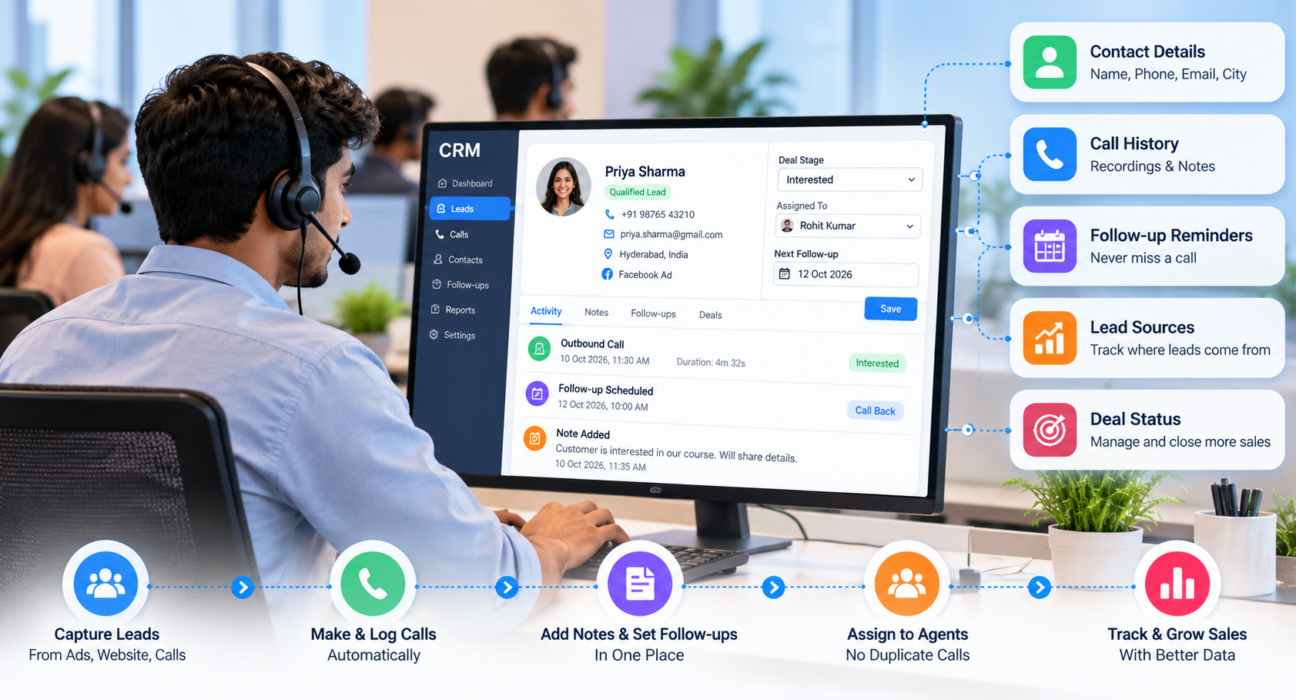
Customer information management software stores everything your business knows about a customer or lead in one shared place: contact details, call history, notes, follow-up dates and deal status. A CRM is the most common form of it.
For telecalling and outbound teams, there is one more requirement. The software should tie into calling, so every call and outcome lands on the right record without anyone retyping it.
What Counts as Customer Information?
Many teams stop at name and phone number. That is rarely enough. A useful record usually also holds:
- Email, city and preferred language
- The lead source, such as a Facebook ad, a property portal or a referral
- Every call, with duration, outcome, notes and recording
- The current stage, assigned agent and deal value
- The next callback date and any pending tasks
- Industry details like course interest, policy type, loan amount or budget
- Whether the person has asked not to be called
You don’t need all of this on day one. Still, the more consistently you record it, the more your data is worth.
Why Spreadsheets Stop Working
Excel is fine for 50 leads and two agents. However, trouble starts when volume grows.
For example, two agents call the same lead because nobody noticed the duplicate. Meanwhile, one person updates their copy of the sheet, and the manager is looking at an older one. Notes are written in five different styles, or not at all. Follow-up reminders live in someone’s memory. Worse, when an agent leaves, a chunk of your customer data walks out with them.
A CRM won’t fix poor discipline by itself. Instead, it makes good habits easier and bad habits visible.
How to Manage Customer Information With CRM Software: 7 Steps
Step 1: Decide What You Need to Know
Start with the questions an agent asks before every call. What did we discuss last time? What is this person interested in? When should we call next?
Collect what helps answer those, and skip the rest. After all, every extra field slows agents down and lowers the quality of what they enter.
Step 2: Standardise the Record
Agree on formats before anyone enters data. Use one phone number format, a fixed list of lead statuses and fixed names for lead sources.
Wherever you can, use dropdowns instead of free text. Otherwise, “Interested”, “interested” and “Intrested” will show up as three different statuses in your report, and the report will be wrong.
Step 3: Clean Your Data Before Importing
Gather leads from spreadsheets, old CRMs and ad platforms. Before importing, remove blank rows and numbers with the wrong digit count. After that, let the CRM handle de-duplication and Do Not Call (DNC) screening, if it offers them. As a result, you avoid many repeat calls and annoyed customers.
Step 4: Connect Your Lead Sources
Copy-pasting leads from ad dashboards and portals is slow, and errors creep in. So if your CRM can pull enquiries in automatically with the source tagged, use that. Speed matters here, because a lead called within minutes still remembers enquiring.
Step 5: Give Every Lead One Owner
Assign by city, language, product or simple round-robin. The rule matters less than the outcome, which is one person responsible at a time. Therefore, two agents won’t chase the same lead, and leads won’t sit untouched because everyone assumed someone else had it.
Step 6: Log the Call and Set the Next Step
After each conversation, the agent notes the outcome, adds a line of context and sets the next follow-up date. This takes under a minute, yet it makes the next call far better. Also, if your CRM already logs duration and outcome automatically, agents only add what software can’t capture, like what the customer was worried about.
Step 7: Review Data Quality Every Week
Once a week, look for leads with no owner, no next follow-up, or no activity in weeks. In addition, question statuses that don’t add up, like “Interested” with no call in 20 days. Clean data is a habit, because a one-time cleanup fades within a month.
What to Store and Why
| Information | Why it matters | Example use |
|---|---|---|
| Lead source | Shows which channels bring serious enquiries | Compare ad leads with portal leads |
| Call history and notes | Gives context before the next call | Agent avoids repeating questions |
| Lead stage | Shows how close a deal is | Manager prioritises hot leads |
| Follow-up date | Prevents missed callbacks | Reminder appears on the agent’s list |
| Custom fields | Captures industry-specific details | Course interest, policy type, budget |
| DNC or consent status | Reduces compliance risk | Excluded from campaigns |
How It Looks in Different Industries
These are hypothetical examples, not customer case studies.
Real estate. A property team gets enquiries from several portals and ads. Each one is tagged with source, budget and preferred location. When a lead asks about a 3 BHK two weeks later, the agent sees the earlier conversation and picks up from there. The Real Estate CRM page covers this use case.
Education. A coaching institute handles hundreds of admission enquiries. Each record holds the course interest, the parent’s name, the counselling date and what was said about fees. If a counsellor goes on leave, a colleague can continue without starting over. See the Education CRM page for more.
Insurance. An agency tracks policy type, renewal date and past call notes, and schedules renewal follow-ups well in advance. Recorded calls can also help when compliance questions come up. More on this is on the Insurance CRM page.
Protecting Customer Data
Customer information is personal data, so careless handling carries legal and reputational risk.
In India, the Digital Personal Data Protection Act, 2023 covers digital personal data. MeitY notified the Digital Personal Data Protection Rules 2025 on 13 November 2025 to operationalise the Act. The law calls the business that decides why and how data is processed a “data fiduciary”, and it expects that business to make sure any processors it hires comply too. hoganlovells
For a sales team, this comes down to a few habits. First, collect only what you need. Second, use role-based permissions so agents see only what their job requires. Third, honour requests not to be called. Also, control exports, since downloaded sheets are a common source of leaks. Lastly, cut off access the day an employee leaves.
This is general information, not legal advice. Please speak to a qualified legal professional about your obligations.
Mistakes That Quietly Ruin Customer Data
Most failures are boring ones. Teams often ask for too many fields, so agents skip them or enter junk. Without naming standards, reports become unreliable. Importing messy data is another trap, because old duplicates simply move into the new system.
Logging notes without a next step turns the CRM into a digital notebook. Giving everyone full access adds both error and security risk. Skipping training is also common, since the tool looks simple. Finally, if nobody reviews the data, stale records pile up.
Fixing even two or three of these makes a visible difference.
Features Worth Looking For
If your team makes outbound calls, check whether the software offers:
- Easy lead import with de-duplication
- Custom fields for your industry
- Automatic call logging with duration and outcome
- Call notes and recordings
- Follow-up reminders and overdue alerts
- Lead assignment rules and role-based access
- Lead source integrations
- Reports on calls, follow-ups and pipeline stages
- A mobile app for remote or field agents
For a wider buying checklist, read our guide on how to choose the best telecalling CRM for your business.
How TeleCallingCRM Can Help
TeleCallingCRM is a CRM built for telecalling and outbound sales teams in India. Going by the information on its website, it covers much of the workflow above. You can import leads by CSV with automatic de-duplication and DNC checks. Lead sources such as Facebook and Instagram Lead Ads, Google Ads, 99acres, MagicBricks, JustDial, WordPress and Google Sheets can feed leads in directly. Leads can be assigned by rules, and calls are logged with duration, outcome, notes and recordings. There are also custom fields, roles and permissions, follow-up reminders, pipeline stages and team reports, plus a mobile app for agents.
It won’t suit everyone. For instance, if your sales don’t run on calls, a general-purpose CRM may fit better. So write down your own process first, then test whether a tool supports it.
Frequently Asked Questions
What is the best way to manage customer information?
Keep all customer data in one shared CRM with standard fields, clear ownership and a next-step date on every record. Log each interaction right away and review data quality weekly. Consistency matters more than the number of features.
How does a CRM store customer information?
A CRM keeps each customer or lead as a record with contact details, source, interaction history, notes, status and tasks. Teams can search and filter these records, and managers can build reports from the same data.
Is a CRM the same as customer information management software?
The two overlap heavily. Customer information management is about storing and organising data. A CRM adds sales tools such as pipelines, follow-ups, assignment and reporting. Most modern CRMs do both.
Can small businesses use a CRM for customer data?
Yes, and they often benefit most, because they outgrow spreadsheets fast. Start simple with a few fields, one status list and a mandatory follow-up date. Then add more only when the team needs it.
How do I move customer data from Excel to a CRM?
Clean the sheet first by removing blank rows, fixing phone formats and standardising column names. Next, export it as a CSV, map the columns during import and let the system check for duplicates. Test with a small batch before importing everything.
How can I keep customer data secure in a CRM?
Use role-based access, limit exports, remove access when employees leave and train agents on handling personal data. Pick software with permission controls, and review your privacy obligations under Indian law with a legal professional.
What should telecallers record after every call?
Record the outcome, the key points discussed, the customer’s level of interest, any promise made and the next follow-up date. When relevant, add industry details such as budget, course or policy type.
Conclusion
Good customer data management comes down to a few habits. Store the right information, keep it consistent, give every lead an owner, log every interaction and review quality often. Software makes those habits easier, but your team still has to define the process.
If your agents work mainly through calls, a CRM designed for that workflow helps. You can request a demo to see how TeleCallingCRM handles leads, call history and follow-ups, and decide whether it fits the way you work.