Best CRM Software for Small Sales Teams in India
If your sales team has five to twenty people, you probably do not need a complex enterprise tool. You need something your agents will actually use, that fits your budget and that keeps leads from slipping away. That is harder to find than it sounds, because many CRMs are built for large companies or for markets outside India.
This guide explains how to choose a CRM for sales teams of a small size, which features matter, what to avoid and how to compare options. If your team sells mostly over the phone, a CRM for small sales teams built around calling can be a better fit than a general-purpose tool.
What Is the Best CRM for a Small Sales Team in India?
The best CRM for a small sales team in India is one that is simple to set up, priced by team size rather than by many add-ons, connects to the lead sources you use, and matches how your team sells. For phone-driven teams, built-in calling, follow-up reminders and a mobile app matter more than advanced enterprise features.
No single CRM is best for every business. A team that sells by calls, a team that sells by email and demos, and a team that sells in the field all need different things.
What Is a CRM for Sales Teams?
A CRM (customer relationship management) system is software that stores your leads and customers, records every interaction and shows where each deal stands. For a sales team, it replaces spreadsheets, WhatsApp groups and personal notebooks with one shared record.
A good sales CRM helps with:
- Capturing leads from different sources
- Assigning leads to the right agent
- Logging calls, notes and outcomes
- Scheduling follow-ups
- Tracking the pipeline from new lead to closed deal
- Reporting on agent and team performance
Why Small Teams Need a CRM Earlier Than They Think
Many small teams wait until lead volume becomes painful. By then, they have already lost leads.
Signs that you need a CRM now:
- Leads are stored in more than one place.
- Two agents sometimes call the same person.
- Follow-ups depend on memory.
- You cannot say how many calls were made yesterday.
- A resigning agent takes lead information with them.
- You do not know which lead source gives paying customers.
If three or more of these sound familiar, a spreadsheet is no longer enough.
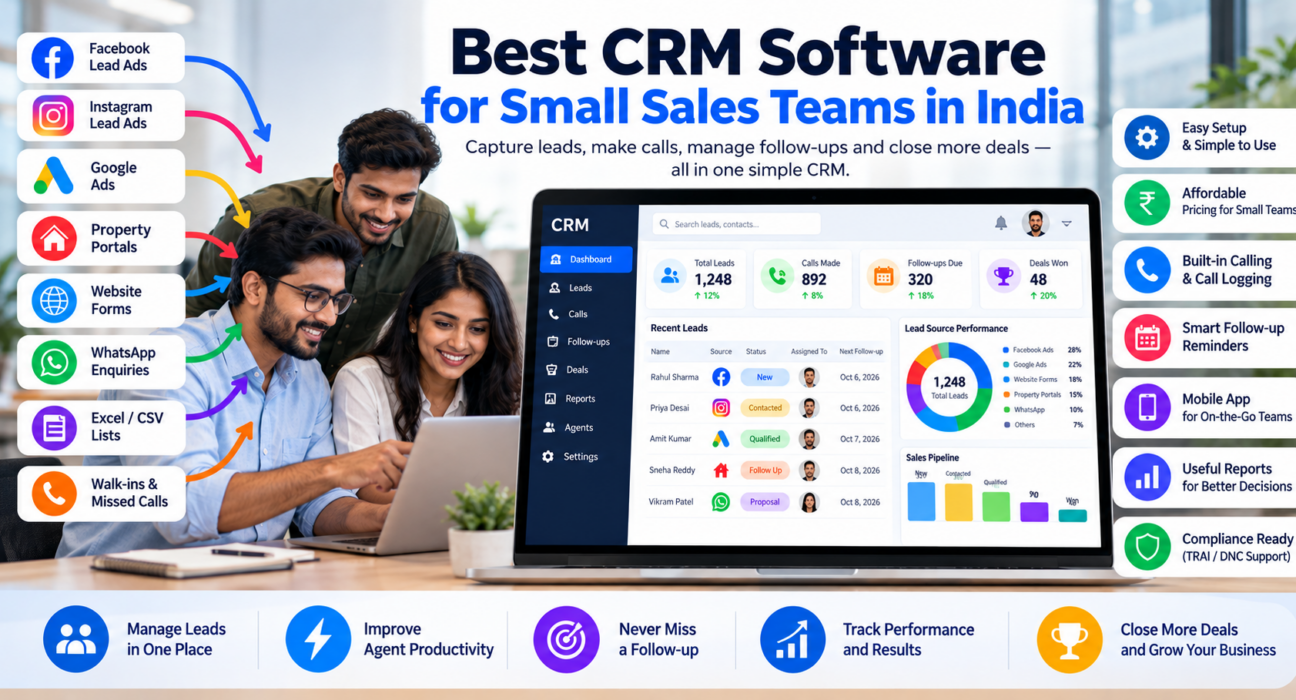
What Small Sales Teams in India Should Look For
1. Simple setup and easy use
A small team has no IT department. Look for a CRM where leads can be imported from a CSV file and agents can start using it within a day or two. If agents find it hard, they will go back to Excel.
2. Clear, predictable pricing
Check whether pricing is per user, per feature or per plan. Per-user pricing can look cheap for two agents and become expensive at ten. Also check whether calling, WhatsApp, reports or the mobile app cost extra, and whether prices include GST.
3. Lead capture from the sources you use
Indian businesses often get leads from Facebook and Instagram ads, Google Ads, property or business portals, JustDial, websites and WhatsApp. A CRM that pulls these leads in automatically saves hours of manual copying and reduces delays.
4. Built-in calling and call logging
If your agents call leads, the CRM should record each call, its duration and outcome. Without this, agents must switch between a dialer and a CRM, and notes are often skipped.
5. Follow-up reminders
Most sales are lost in follow-up, not in the first call. The CRM should let agents set a callback date and alert them when it is due or overdue.
6. Mobile app
Agents who work remotely or from the field need to call, update leads and check follow-ups from their phones.
7. Reports a manager can use
At minimum, you want calls made, connected calls, follow-ups due, leads by stage and results by agent and by source. You do not need fifty reports. You need five you actually read.
8. Compliance basics
If you call prospects, your CRM and process should support Do Not Call (DNC) checks and call recording practices that follow Indian rules. Check the current TRAI guidelines that apply to your business.
Generic CRM vs Telecalling CRM: Which Fits a Small Team?
| Factor | General sales CRM | Telecalling CRM |
|---|---|---|
| Main focus | Managing contacts, deals and email | Managing calls, leads and follow-ups |
| Calling | Often needs a separate dialer or add-on | Usually built in |
| Best for | Longer sales cycles, email-based selling | High-volume phone-based selling |
| Setup effort | Can be higher | Usually lower for calling teams |
| Pricing | Often per user, with feature tiers | Varies; check carefully |
| Typical users | B2B teams, account managers | Telecallers, inside sales, admissions, loan and insurance teams |
If most of your leads are converted over the phone, a telecalling CRM usually fits better. If your deals depend mainly on email, demos and long proposals, a general CRM may suit you.
How to Choose a CRM for Your Sales Team: Step by Step
- Write down how you sell. Do you call, visit, email or all three?
- List your lead sources. Include informal ones such as WhatsApp.
- Count your users. Include managers and part-time agents.
- Set a monthly budget. Include GST and any add-ons.
- Shortlist two or three tools. More than that makes comparison hard.
- Run a trial with real leads. Import a sample list and let two agents use it for a few days.
- Check support. Ask how quickly the vendor responds, and in which languages.
- Decide with your team. The people using it daily should have a say.
Examples: Small Teams and What They Need
These are hypothetical examples to illustrate selection. They are not customer case studies.
A real estate team of six receives leads from Facebook ads and property portals. It needs automatic lead capture, duplicate checks and quick assignment so that the same buyer is not called twice. A real estate-focused setup, such as the real estate CRM page, shows how this works.
A coaching institute with eight counsellors runs Google Ads and Instagram campaigns. It needs follow-up reminders, call notes and course-wise reports so the head of admissions can see which campaign brings enrolments.
An insurance agency of five calls renewal and cold-data leads. It needs DNC checks, call recording and easy reassigning of leads between agents.
A B2B services firm of ten sells through calls, emails and meetings. It may need a general CRM with strong email and deal tracking, and could add a calling tool separately.
Common Mistakes When Choosing a CRM
- Buying for features you will never use. Complexity slows adoption.
- Ignoring total cost. Per-user fees, add-ons and GST add up.
- Skipping the trial. A demo shows the best case. A trial shows your case.
- Not involving agents. If agents dislike the tool, data quality suffers.
- Importing messy data. Clean duplicates and wrong numbers before you migrate.
- No process. A CRM cannot decide who owns a lead or when to call. You must set rules.
- Ignoring data ownership. Ask how you can export your data if you leave.
How TeleCallingCRM Fits Small Sales Teams
TeleCallingCRM is a telecalling CRM built for Indian sales teams that sell by phone. Based on its website, relevant capabilities include:
- Lead management: Import, assign and track leads, with lead scoring, de-duplication and DNC checks.
- Lead-source integrations: Facebook and Instagram Lead Ads, Google Ads, 99acres, Housing, MagicBricks, JustDial, Sulekha, TradeIndia, Wix, WordPress and Google Sheets, with Zapier also listed.
- Calling: An auto dialer, call tracking, call recording and notes.
- Follow-ups: Reminders, overdue alerts and recurring follow-ups.
- Pipeline and reports: Deal values by stage, plus performance by agent and by source.
- Messaging: WhatsApp templates, SMS and email.
- Mobile app and AI call analysis: For field agents and call review.
On pricing, the website lists plans starting at ₹999 per month for up to 5 users, with higher plans for 10 and 20 users, prices excluding GST, and a 3-day free trial. Check the pricing page for current details before deciding.
It suits teams that sell mainly through outbound or inbound calls. If your sales depend mostly on email sequences or complex enterprise deal tracking, compare it carefully against general CRMs. For a longer buying checklist, read how to choose the best telecalling CRM.
Quick Checklist Before You Buy
- Does it connect to my lead sources?
- Can my agents learn it in a day or two?
- Is pricing clear for my team size, including GST?
- Does it include calling and call logging?
- Does it have follow-up reminders?
- Is there a mobile app?
- Can I see reports by agent and by source?
- Can I test it with my real data?
- Can I export my data if I leave?
Frequently Asked Questions
What is the best CRM for small sales teams in India?
It depends on how you sell. For phone-based teams, a telecalling CRM with built-in calling, follow-ups and Indian lead-source integrations is usually a good fit. For email-led or long-cycle B2B sales, a general sales CRM may suit better. Always run a trial before deciding.
How much does a CRM cost for a small team in India?
Prices vary widely. Some CRMs charge per user per month, others charge flat plans by team size. Compare the total yearly cost, including GST, add-ons for calling or WhatsApp and any setup fees, rather than only the starting price.
Do small teams really need a CRM?
Not always at the very start. If you have a handful of leads and one salesperson, a spreadsheet can work. Once leads come from several sources and more than two people follow up, a CRM reduces missed leads and gives better visibility.
What is the difference between a CRM and telecalling software?
A CRM stores leads and tracks the sales process. Telecalling software focuses on making and logging calls. A telecalling CRM combines both, so agents can call, record outcomes and schedule follow-ups in one place.
Can I move my Excel leads into a CRM?
Yes. Most CRMs allow CSV or Excel import. Before importing, remove duplicates, fix phone number formats and add a source column. This makes reports far more useful later.
Is a mobile app important for a sales CRM?
It is important if agents work remotely or in the field. A mobile app lets them make calls, update lead status and check follow-ups without a desktop. Check which platforms the app supports before you commit.
How long does it take to set up a CRM?
Simple CRMs can be running within a day, especially if you only import leads and assign agents. Connecting lead sources, customising fields and training the team can take a few days to two weeks.
How do I get my team to use the CRM?
Keep the setup simple, train agents on a few core actions, and make the CRM the only place where leads and follow-ups are recorded. Review CRM data in your daily or weekly meetings so agents see it matters.
Conclusion
A good CRM for sales teams of any size should be easy to use, fairly priced and matched to how your team sells. Start with your lead sources, your calling needs and your budget, then test two or three options with real leads before choosing.
If your team follows up by phone, look for lead follow-up software that combines lead capture, calling and reminders so no enquiry is left waiting. Whichever tool you choose, a clear process will matter as much as the software.