Sales Activity Tracking: How to Monitor Your Sales Team Without Micromanaging
You ask your team how the day went and get the same answer: “Lots of calls, sir.” But how many calls connected? How many follow-ups were done? Who was idle for two hours? Without data, a manager can only guess, and good agents get judged the same way as average ones.
Good sales activity tracking in a CRM replaces guesswork with facts, so you can coach people, spot problems early and reward real effort. This guide explains what to track, how to set it up and how to do it fairly.
What Is Sales Activity Tracking?
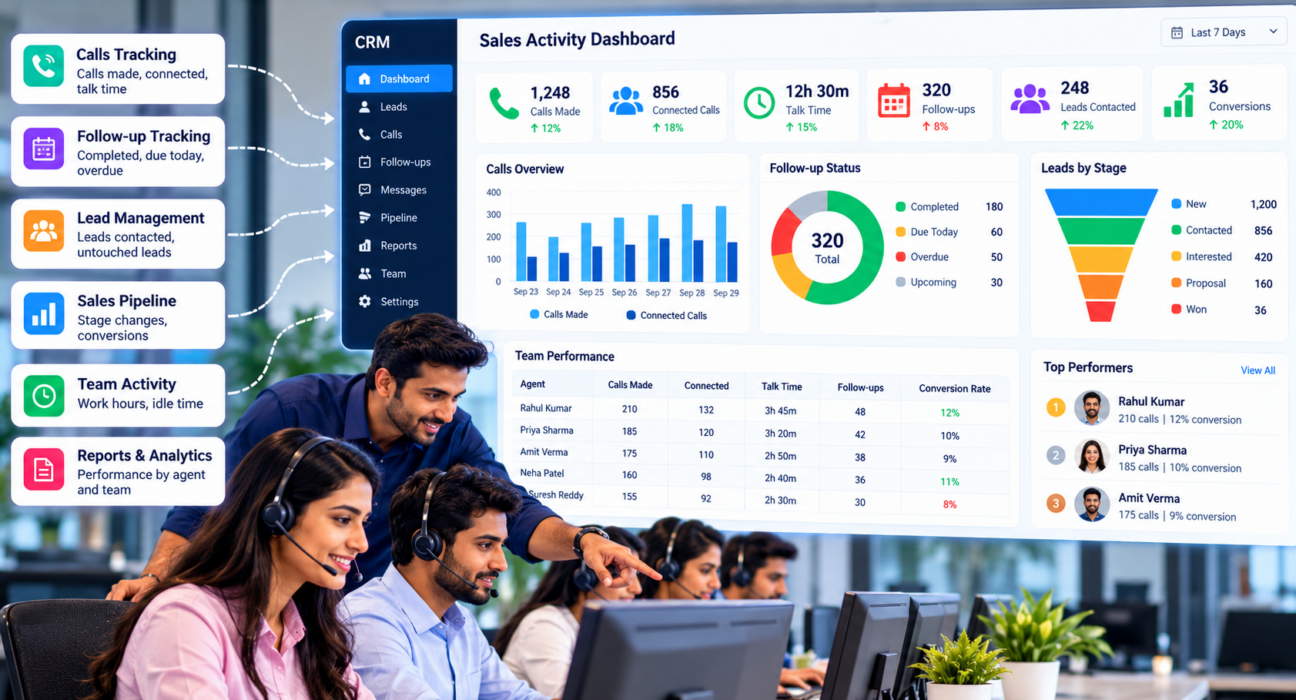
Sales activity tracking means recording and reviewing the actions your sales team takes, such as calls made, calls connected, follow-ups completed, messages sent and leads moved between stages. A CRM captures these automatically, so managers can see performance by agent, team and period, and connect activity to results.
It answers the question “What is my team actually doing?” while outcome metrics answer “Is it working?”
Why Manual Tracking Falls Short
Many teams still rely on end-of-day messages or shared sheets. This creates several problems:
- Agents spend time reporting instead of selling
- Numbers are entered from memory and may be inaccurate
- Managers see yesterday’s story, not today’s
- Different agents count activity differently
- Good and weak performance both stay hidden until month-end
Admin work is already a burden. Salesforce’s sales research found that reps spend only about 28% of their week actually selling. This is a global survey, not a telecalling-specific figure, but it shows why tracking should be automatic. If your system needs agents to type every update, it adds to the problem.
Which Sales Activities Should You Track?
Start with a short list. Track what you can act on.
| Activity | What to measure | Why it matters |
|---|---|---|
| Calls made | Calls per agent per day | Shows effort and workload |
| Connected calls | Connect rate or answer rate | Shows list quality and calling time |
| Talk time | Total and average per call | Shows conversation depth |
| Follow-ups | Completed, due today and overdue | Shows discipline and lead care |
| Lead handling | Leads contacted, untouched leads | Shows whether leads are being worked |
| Pipeline movement | Stage changes and deal value | Links activity to progress |
| Availability | Hours worked vs hours on calls, idle time | Shows how time is used |
Avoid tracking everything. Too many numbers hide the few that matter.
Activity Metrics vs Outcome Metrics
Activity numbers show effort, not results. An agent can make 150 calls and still sell nothing. Always pair them with outcomes:
- Conversion rate from lead to sale
- Revenue or deals won
- Conversion by lead source
- Average deal size
If activity is high and outcomes are low, look at script quality, lead quality or training. If activity is low and outcomes are good, find out what that agent does differently before assuming a problem.
How to Set Realistic Targets
Targets work only when agents believe they are fair. Look at the last four to eight weeks of data for each agent and for the team. Set targets slightly above the current average, and adjust them for lead type, since a warm referral list behaves differently from a cold database.
Review targets every month. If most of the team misses a target, the target may be wrong, or the process may need fixing.
How to Set Up Sales Activity Tracking in 6 Steps
- Decide your goals. Do you want better follow-ups, more connected calls or faster response? Choose one or two.
- Pick five to seven metrics. Use the table above as a starting point.
- Define each metric. Agree what counts as a call, a connected call and a completed follow-up.
- Capture data automatically. Use a CRM that logs call duration and outcomes without extra typing.
- Set targets with the team. Use daily and monthly targets based on past data and the type of leads.
- Review on a fixed schedule. Look at the numbers daily, weekly and monthly, and act on them.
A Simple Review Rhythm
- Daily (10 minutes): check calls made, overdue follow-ups and who needs help.
- Weekly: compare agents, review untouched leads and listen to a few calls.
- Monthly: review conversion by source, targets and training needs.
Share the numbers with agents. Tracking works best when people can see their own progress.
What a Good Activity Dashboard Should Show
When you evaluate any tool, check that a manager can answer these questions in a minute or two:
- Who is on a call, idle or away right now?
- How many follow-ups are overdue, and for whom?
- Which agents are above or below target this month?
- Which lead sources give the best connect and conversion rates?
- Which calls need review, for example very short or flagged calls?
If you need to export data to a sheet to answer these, the tracking is not doing its job.
Example: Reading the Numbers (Hypothetical)
Consider a hypothetical real estate telecalling team. Three patterns appear in one week’s report:
- Agent A makes many calls, but the connect rate is low. The manager checks calling times and lead quality before blaming the agent.
- Agent B has long talk times but few site visits booked. This suggests a coaching need around closing the conversation.
- Agent C has fewer calls but the best conversion. The manager reviews recordings to learn what works and shares it.
Activity data shows where to look. It does not give the answer by itself.
Track Fairly and Transparently
Monitoring can feel like surveillance if handled badly. Keep it fair:
- Tell agents what is tracked and why
- Focus on coaching, not punishment
- Compare agents on the same lead types and shifts
- Respect customers’ privacy, and follow DNC and consent rules when calling or recording
- Store recordings and customer data securely
Customer data is also covered by India’s Digital Personal Data Protection Act, 2023. Confirm the current requirements with a legal adviser.
Common Mistakes in Sales Activity Tracking
- Tracking too many metrics. Choose a few and use them.
- Judging only by call count. Effort without results needs context.
- Making agents report manually. It wastes selling time and reduces accuracy.
- Using data only for punishment. People then hide problems.
- Ignoring lead quality. Poor leads can make a good agent look weak.
- Not acting on the data. A report that nobody reads changes nothing.
How TeleCallingCRM Supports Sales Activity Tracking
TeleCallingCRM is built for outbound calling teams. According to its website, it includes:
- Automatic call tracking, with duration captured from the call log and outcomes logged in one tap
- A live war room showing agents who are on a call, in wrap-up, idle, away or on leave
- Talk time, idle time, attendance and utilisation, with punch in and out from the mobile app
- Monthly targets per agent, benchmarking against the team average and a leaderboard by calls, talk time, conversions or revenue
- Team alerts for flagged calls, offline agents and idle thresholds
- A dashboard with connection rate, answer rate, conversion funnel, source performance and agent comparison
- A custom report builder with CSV, Excel and PDF export
- AI call analysis, which can be enabled to summarise calls and give a quality score with coaching notes
You can read more in the blog on the Live War Room and reports. The site lists plans from ₹999 per month and a 3-day free trial, so you can test the reports with your own team. See the pricing page for current details. It is designed for calling teams, so check that the metrics match how you work.
Frequently Asked Questions
What is sales activity tracking?
Sales activity tracking is the practice of recording what a sales team does, such as calls, follow-ups, messages and stage changes, and reviewing it by agent and period. A CRM usually captures this automatically.
Which sales activities are most important to track?
For calling teams, start with calls made, connect rate, talk time, follow-ups completed and overdue, and leads contacted. Add pipeline movement and conversion so activity is tied to results.
How do I monitor my sales team without micromanaging?
Track a few clear metrics, capture data automatically and review on a fixed schedule. Share the numbers with agents, set targets together and use the data for coaching. Avoid checking people minute by minute.
What is the difference between activity metrics and outcome metrics?
Activity metrics measure effort, such as calls made or follow-ups done. Outcome metrics measure results, such as conversions and revenue. You need both to know whether effort is turning into sales.
Can a CRM track calls automatically?
Many CRMs do, though how they do it differs. Some log call duration and outcomes automatically, while others need manual entry. Check this during a trial, using the phones your agents actually use.
How many calls should a telecaller make in a day?
There is no universal number. It depends on your product, lead quality and call length. Use your own historical data to set a realistic target, and measure connected calls and conversions, not only dials.
Conclusion
Sales activity tracking helps managers see what is happening, coach with facts and spot problems before the month ends. Keep the metrics few, capture them automatically, review them regularly and treat the data as a tool for improvement, not punishment.
If your team makes outbound calls, you can try telecalling software with a free trial and see which activity reports are useful for your process.