How Real-Time Field Data Improves Business Decision-Making
When your field team is out of the office, most of what you know about their day comes from end-of-day calls, WhatsApp messages, and spreadsheets filled in from memory. By the time that information reaches you, the day is over and the decisions you could have made are gone.
Real-time field data closes that gap. It gives managers live information about where teams are, what they have completed, and what is going wrong, so they can act while work is still in progress. This guide explains what real-time field data is, how it improves business decisions, and how to start using it.
What Is Real-Time Field Data?
Real-time field data is information about field activity that is captured at the moment it happens and made available to managers within seconds or minutes, rather than at the end of the day or week.
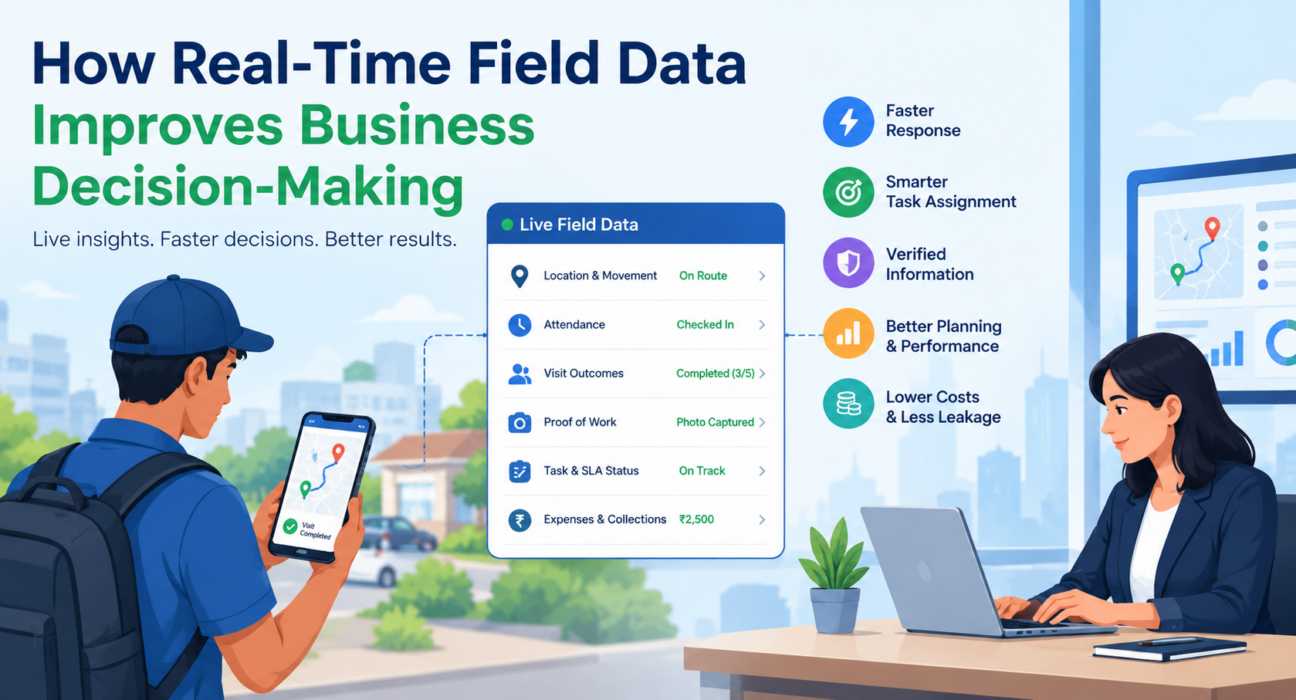
It typically includes:
- Location and movement: where each field employee is and the route they actually took
- Attendance: when and where each person started and ended their day
- Visit outcomes: which customer visits were completed, missed, or rescheduled
- Proof of work: photos, signatures, OTPs, and checklist responses captured on site
- Task and SLA status: what is pending, in progress, or at risk of breaching a deadline
- Money movement: expense claims and field collections as they are recorded
The key difference from traditional reporting is timing. A weekly report tells you what went wrong. Real-time field data shows you what is going wrong now.
Why Delayed Field Data Leads to Poor Decisions
Most field operations problems are not caused by lack of effort. They are caused by lack of visibility. Managers who rely on delayed or self-reported data usually run into the same issues:
- Decisions based on assumptions. Without live data, you guess which rep is closest to an urgent job or which territory is behind.
- Problems found too late. A missed customer visit or a delayed delivery is discovered after the customer has already complained.
- Unverified activity. If there is no proof a visit happened, reports rely on trust alone.
- Administrative drag. Hours go into collecting updates, chasing reps, and reconciling spreadsheets instead of coaching and planning.
- No reliable baseline. Without clean, consistent data, it is hard to tell which routes, reps, or customers perform well and why.
How Real-Time Field Data Improves Business Decision-Making
Good decisions need three things: accurate information, delivered quickly, in a form people can act on. Here is how real-time field data supports each of them.
1. Faster Response to Problems
Real-time data shortens the time between a problem occurring and a manager acting on it.
If a technician is stuck at a previous job, or a rep has not punched in by mid-morning, a manager sees it immediately. They can reassign the task, call the customer, or send support while it still matters.
2. Smarter Task Assignment and Dispatch
When urgent work comes in, the right question is “who is closest and available?” Live location and status data answer it directly. Instead of calling several people, a manager can assign the job to the best-placed person and reduce response time.
3. Verified Information Instead of Self-Reports
Proof-based data replaces trust-based reporting.
Geofenced attendance, GPS-stamped visits, and photo or signature capture create a verifiable record of presence and work. Decisions about performance, payouts, and customer escalations then rest on evidence rather than recollection.
4. Better Planning and Route Decisions
Actual route data shows how long travel really takes, which stops are consistently delayed, and where territories are unbalanced. Managers can use it to redesign beat plans, rebalance workloads, and set realistic visit targets. This is far more reliable than planning from an assumed picture of the field.
5. Fairer, More Accurate Performance Management
When visits, tasks, and outcomes are recorded as they happen, performance conversations become specific. You can see which reps hit their visit targets, which ones struggle with follow-ups, and where coaching will help. Leaderboards and KPI dashboards built on live data also make results easier to compare fairly.
6. Tighter Control Over Costs and Leakage
Expenses, mileage, and collections are major sources of leakage when they live in spreadsheets and paper receipts. Receipt-backed claims and tracked collections give finance and operations teams current figures to approve, question, or investigate quickly.
7. Stronger Customer Commitments
For service teams, SLA timers and live job status make it clear which jobs are at risk before they breach. For sales teams, visit data shows which accounts have not been covered. Both lead to better customer outcomes.
Real-Time vs. Delayed Field Data: A Comparison
| Decision Area | With Delayed Data | With Real-Time Field Data |
|---|---|---|
| Task assignment | Based on phone calls and guesswork | Based on live location and availability |
| Attendance | Self-reported or manually checked | GPS-stamped and geofenced |
| Visit verification | Trust-based | Proof of presence and proof of work |
| Problem detection | After the day ends | While work is in progress |
| Route planning | Based on assumptions | Based on actual travel patterns |
| Performance reviews | Memory and anecdotes | Recorded visits, outcomes, and KPIs |
| Expense and collection control | Reconciled after the fact | Tracked from claim to settlement |
Practical Examples of Real-Time Field Data in Action
These are illustrative scenarios of how the data gets used, not customer case studies.
Field sales team. A sales manager notices through live visit data that a key distributor has not been visited this week. They redirect a nearby rep instead of waiting for the weekly review.
Field service team. A repair request with a tight SLA arrives. The dispatcher sees which technician is closest and free, assigns the job, and monitors the SLA timer until closure.
Collections team. A manager tracks which recovery visits happened, what was collected, and which accounts need a follow-up, all without waiting for end-of-day reconciliation.
Delivery team. A logistics supervisor sees a delay building on one route and rebalances stops before commitments are missed.
How to Start Using Real-Time Field Data: 6 Steps
- Define the decisions you want to improve. Examples include dispatch, attendance verification, visit coverage, and expense approval.
- Choose the data points that matter. Start with location, attendance, visit status, and proof of work. Add more later.
- Standardize how data is captured. Use consistent checklists and forms so every rep records the same information in the same way.
- Make capture easy for field teams. If it is slow or needs constant network access, adoption suffers. An offline-first mobile app helps.
- Set up dashboards and alerts. Give managers a live view and flag exceptions such as missed punch-ins or SLA risks.
- Review and act on the data regularly. Use it for daily check-ins, weekly coaching, and planning route or territory changes.
Common Challenges (and How to Handle Them)
- Team resistance. Explain what data is collected and why, and keep tracking limited to working hours. Location features should apply only to on-duty staff who have granted permission.
- Poor connectivity. Choose tools that capture data offline and sync when the connection returns.
- Data overload. Focus on a small set of KPIs tied to real decisions rather than tracking everything.
- Disconnected tools. Spreadsheets, chat groups, and separate apps create gaps. A single platform keeps data consistent.
Which Tools Do You Need?
Spreadsheets and messaging apps can record field activity, but they cannot deliver it live, verify it, or organize it into reports. Real-time field data usually requires dedicated field force management software that connects a mobile app for field employees with a live dashboard for managers.
Capabilities worth looking for include live GPS tracking, geofenced attendance, task and visit management, proof capture, SLA monitoring, expense and collection tracking, and real-time KPIs.
How FieldExecutives Helps You Use Real-Time Field Data
Businesses looking to simplify these processes can use field force management software such as FieldExecutives. It brings field activity into one live view, so managers do not have to piece it together from calls and spreadsheets.
Based on the platform’s published features, FieldExecutives supports:
- Live team map: see field employees, status, and movement in one place, with a GPS breadcrumb trail of where each person went
- Geofenced attendance: server-time punch-ins with geofence enforcement and mock-location detection
- Proof of visit: photo, signature, OTP, and checklist capture before a job closes
- Task assignment and SLA monitoring: assign work with priorities and deadlines, and track SLA status
- Offline-first mobile app: reps can work without a network and sync when they reconnect
- Expense and collection tracking: receipt-backed claims and collections tracked through to settlement
- Real-time KPIs and custom forms: dashboards, leaderboards, and no-code forms to capture the data your workflow needs
The platform serves several field-heavy industries, including FMCG and distribution, field service and repair, logistics, banking and collections, and pharma. Results depend on how well the tool is set up and used, so any improvement should be measured against your own baseline.
Conclusion
Field teams make dozens of small decisions every day, and managers make bigger ones based on what they know about those teams. When that knowledge arrives late or unverified, decisions suffer. Real-time field data gives managers a current, verifiable view of field operations, so they can assign work better, catch problems early, plan routes with facts, and manage performance fairly.
The practical takeaway is to start small. Pick two or three decisions you want to improve, capture the data behind them reliably, and review it consistently. Then use field force management software to make that process routine rather than manual.