Best CRM for Managing Customer Calls and Contact History
Most teams do not lose leads because their agents cannot sell. They lose them because nobody remembers what was said on the previous call. A CRM fixes this by saving every call, note and follow-up against the right contact, so any agent can continue the conversation without asking the customer to repeat everything. If your team calls leads every day, customer call management software that keeps calls and contact history in one place is far more reliable than spreadsheets and phone call logs. This guide explains what to look for, how to compare options and which mistakes to avoid.
What Is Customer Call Management Software?
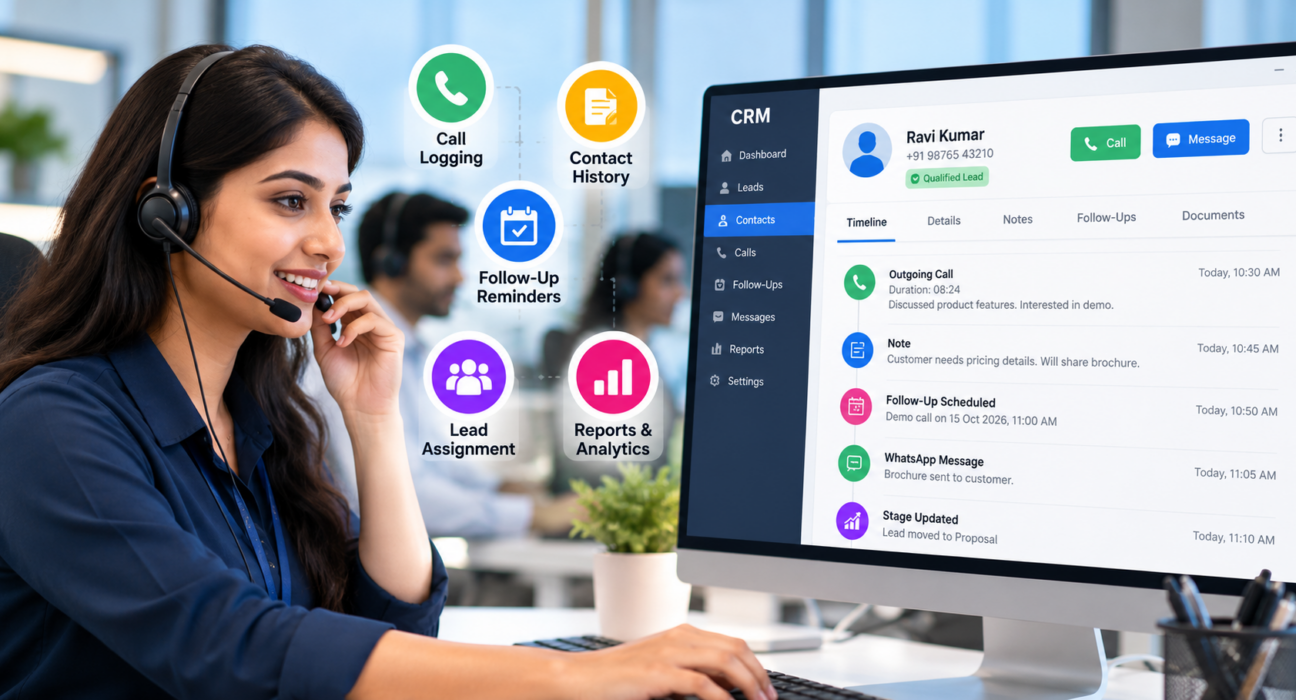
Customer call management software records every customer call, links it to a contact profile, and stores the outcome, notes and next follow-up date in one timeline. Agents, managers and support staff can then see the full conversation history before they dial again.
The best CRM for managing customer calls and contact history usually does these things:
- Logs every call automatically, with duration and outcome
- Shows one timeline per contact, including notes and messages
- Schedules follow-ups and sends reminders
- Assigns leads to the right agent without manual work
- Gives managers simple reports on calls and conversions
- Works on mobile for agents who are away from a desk
Why Spreadsheets and Phone Logs Fall Short
Many small teams start with Excel sheets and the phone’s call log. This works until the team grows beyond two or three people.
Common problems include:
- Two agents calling the same lead on the same day
- Notes saved in personal WhatsApp chats or notebooks
- Follow-ups forgotten because nobody set a reminder
- No way for a manager to see who called whom and what happened
- Lost history when an agent leaves the company
A CRM turns these scattered details into one shared record.
What Should Contact History Include?
Contact history is more than a list of dialled numbers. To be useful before the next call, it should hold:
- Call date, time, duration and outcome
- The agent’s notes in plain language
- Lead source, such as an ad, property portal or website form
- Current pipeline stage and expected deal value, if relevant
- Scheduled and completed follow-ups
- Messages sent by SMS, email or WhatsApp
- Call recording or summary, where permitted by law and your own consent process
Key Features to Look For
1. Automatic Call Logging
Agents should not type call details by hand. Look for a system that captures call duration and lets agents save the outcome in one tap. This keeps data consistent and saves time on every call.
2. A Single Timeline per Contact
Calls, notes, messages and stage changes should appear together. If history is spread across tabs, agents will skip reading it.
3. Follow-Up Reminders
Most deals need several touchpoints. Reminders, overdue alerts and a clear daily list of callbacks help agents act at the right time. Good lead follow-up software should make a missed callback hard to ignore.
4. Lead Assignment and Duplicate Control
Rules such as round-robin or language-based assignment reduce delays. Duplicate detection stops two agents from contacting the same person.
5. Call Recording and Notes
Recordings help with training and dispute handling. Check how they are stored, who can listen and how long they are kept.
6. Reports for Managers
Look for connection rate, talk time, follow-up completion and agent comparison. These numbers show where your process needs work.
7. Mobile Access
Field teams and remote agents need to call, log outcomes and follow up from their phones.
8. Lead Integrations
Leads often arrive from ad platforms, property portals or your website. A CRM that receives them automatically saves manual imports.
Questions to Ask Any Vendor
| Area | Question to ask |
|---|---|
| Call logging | Is duration and outcome captured automatically? |
| Contact history | Can I see calls, notes and messages in one place? |
| Follow-ups | Are reminders and overdue alerts included? |
| Recording | Where are recordings stored and who can access them? |
| Reporting | Can I export reports by agent, date and source? |
| Compliance | Does it skip DND numbers and respect calling hours? |
| Pricing | Are features locked behind higher plans or per-user add-ons? |
Outbound or Inbound: Which Do You Need?
This decision shapes which CRM suits you. Outbound telecalling teams, such as sales, admissions, loan and insurance teams, need dialling, lead queues and follow-ups. Inbound support teams usually need queue management, call routing and ticketing. Some businesses need both.
Be clear about this before comparing tools. A CRM built for outbound telecalling may not replace a full inbound contact centre system with IVR and queue routing. Larger operations can also review how a call center CRM is positioned, and ask vendors directly about inbound needs.
How to Choose the Right CRM: Step by Step
- Map your call process. Write down how a lead is received, assigned, called, followed up and closed.
- List your must-haves. Separate essentials (call logging, history, reminders) from nice-to-have extras.
- Check devices. Decide whether agents work on desktops, phones or both.
- Review pricing carefully. Look for per-user charges, add-ons and feature limits.
- Test with real data. Import a small lead list and run a trial with two or three agents.
- Check data handling. Ask about encryption, access roles, retention and deletion.
- Review after a few weeks. Look at follow-up completion and missed callbacks before rolling out to everyone.
For a broader evaluation framework, you can also read this guide on how to choose the best telecalling CRM for your business.
Practical Examples
These are hypothetical examples to show how contact history helps.
Real estate: A buyer enquires about a 3BHK through a property portal. The agent notes the budget and preferred location, then sets a Saturday callback. When another agent covers the weekend, the notes are already there, so the buyer does not repeat everything. Teams can see how this works on the real estate CRM page.
Education: A coaching centre receives enquiries for two courses. The counsellor records the student’s exam date and fee concern, then sets a reminder three days before the batch starts. The education CRM page covers similar admission workflows.
Insurance: A renewal call goes unanswered. The CRM stores the attempt and prompts another follow-up at a different time of day, so the renewal is not forgotten. See also the insurance CRM page.
Common Mistakes to Avoid
- Choosing by price alone. Cheap tools may lock key features such as reports or recordings.
- Skipping the trial. Features look similar on websites, but daily use shows the real difference.
- Ignoring agent adoption. If logging takes too many taps, agents will avoid it.
- Not defining call outcomes. Use clear statuses such as Interested, Callback, Not Reachable and Not Interested.
- Forgetting compliance. Calling DND-registered numbers or calling at the wrong hours can lead to complaints and penalties.
- No review routine. Reports only help when managers act on them.
Do Not Ignore Calling Compliance
In India, TRAI regulates commercial calls. Its Telecom Commercial Communications Customer Preference Regulations cover customer preferences such as DND registration, and commercial communication is restricted during late-night and early-morning hours. Rules and penalties change, so check the latest TRAI guidance and take legal advice for your situation.
Your CRM can support compliance by skipping DND numbers and enforcing a calling-hours window. Consent matters too, especially for call recordings.
How TeleCalling CRM Can Help
TeleCalling CRM is built for outbound telecalling teams in India. Based on the information on its website, these capabilities are relevant to call and contact history:
- Auto dialer with call logging: Call duration is captured from the phone’s call log, and agents save the outcome in one tap.
- Lead timeline: Each lead holds call history, notes and source. See the features page for details.
- Follow-ups and reminders: One-tap scheduling, overdue alerts and Today, Overdue and Upcoming lists.
- Lead assignment: Round-robin, language-match or fixed-agent rules, with de-duplication on import.
- Recording and AI call analysis: Encrypted recordings, plus transcripts, summaries and sentiment (the site lists English, Hindi and Hinglish, and describes AI analysis as opt-in).
- Messaging: SMS, email and WhatsApp on one lead timeline.
- Reports and live monitoring: Dashboards, connection rate, leaderboards and a live team view.
- Mobile app: Available for Android and iOS.
- Lead integrations: Sources such as Facebook and Instagram Lead Ads, Google Ads, 99acres, MagicBricks and JustDial. See the integration guides.
- DNC enforcement and a calling-hours window on the dialer.
The website also mentions a free 3-day trial and says every feature is included in every plan. Plans and limits can change, so confirm the latest details on the pricing page. Since the product is outbound-focused, teams that need inbound IVR or queue routing should check the fit first.
Frequently Asked Questions
What is the best CRM for managing customer calls and contact history?
There is no single best option for everyone. The right CRM logs calls automatically, shows one timeline per contact, sends follow-up reminders and gives clear reports. Shortlist two or three tools, then trial them with real leads and real agents before deciding.
What is the difference between a CRM and call management software?
A general CRM stores customer records, deals and tasks. Call management software focuses on dialling, logging and tracking calls. Many telecalling CRMs combine both, so calls, notes and pipeline stages sit on the same contact record.
What is a telecaller CRM?
A telecaller CRM is software for teams that make outbound calls to leads or customers. It manages lead lists, dialling, call outcomes, follow-ups and agent performance. It differs from a generic CRM because the call workflow is central.
Can a CRM record customer calls?
Many can, depending on the tool and setup. Check where recordings are stored, whether they are encrypted, who can listen and how long they are retained. Also follow consent and legal requirements that apply to your business.
How do I make sure no lead is forgotten?
Set a follow-up date after every call, and use reminders and overdue alerts. Managers should review overdue follow-ups daily. Automatic follow-up suggestions based on call outcome can reduce manual work.
Is a CRM useful for a small telecalling team?
Yes. Even a team of three or four benefits from shared history, duplicate control and reminders. The main risk is paying for features you will not use, so compare plans carefully and use a trial.
What should Indian businesses check for calling compliance?
Check DND handling, calling hours, consent for recordings and data retention. Read the current TRAI guidance and confirm that your CRM supports these controls. For legal certainty, consult a qualified professional.
Conclusion
Choosing customer call management software comes down to one question: when an agent opens a contact, can they see what happened before? Prioritise automatic logging, clear history, follow-up reminders and simple reports, then test with real data. If you want to see how a telecaller CRM handles your own call workflow, you can request a demo and compare it with your shortlist.