Field Sales Order Management Software: How to Track Retailer Orders and Sales From the Field
Your sales rep visits 25 retailers a day. Some orders go on a notebook page, some in a WhatsApp message, a few are only remembered. By evening, you can’t say which orders were booked, which visits happened, or which retailers were missed.
This is the problem field sales order management software solves. It lets reps capture retailer orders on their phones, and it gives managers live visibility into orders, visits and sales. This guide covers how order tracking from the field works, where manual methods fail, and what to look for in a tool.
What Is Field Sales Order Management Software?
Field sales order management software is a mobile and web platform that lets field sales reps record retailer orders during visits, and lets managers track those orders, visits and sales in real time. It replaces notebooks, calls, spreadsheets and chat messages with one verified record.
A typical setup has three parts:
- A mobile app for reps to see their route, visit retailers and book orders.
- A manager console to track team activity, orders and performance live.
- A reporting layer that turns visit and order data into usable numbers.
Why Tracking Retailer Orders From the Field Is Hard
Field sales is hard to track because the work happens away from the office. Most order-tracking problems come from a few common gaps.
Orders arrive late and incomplete
When reps pass orders by phone or message at the end of the day, details get lost or garbled. Quantities, product variants and delivery instructions are the usual casualties. Order processing then starts hours later than it could have.
No proof the visit happened
Without verification, a manager can’t confirm a rep reached the retailer. Missed visits and inflated visit reports stay hidden until sales drop.
Spreadsheets break at scale
A shared sheet works for five reps. With dozens of reps, multiple beats and many retailers, versions multiply, entries conflict and nobody trusts the numbers.
Poor connectivity in outlets
Many retail outlets sit in areas with weak mobile coverage. An app that needs constant internet fails exactly when the rep is standing in the shop.
Delayed sales visibility
If sales data arrives a week later in a report, managers can’t react. They learn about a coverage gap or a slow-moving product after the month has already closed.
How to Track Retailer Orders and Sales From the Field: 6 Steps
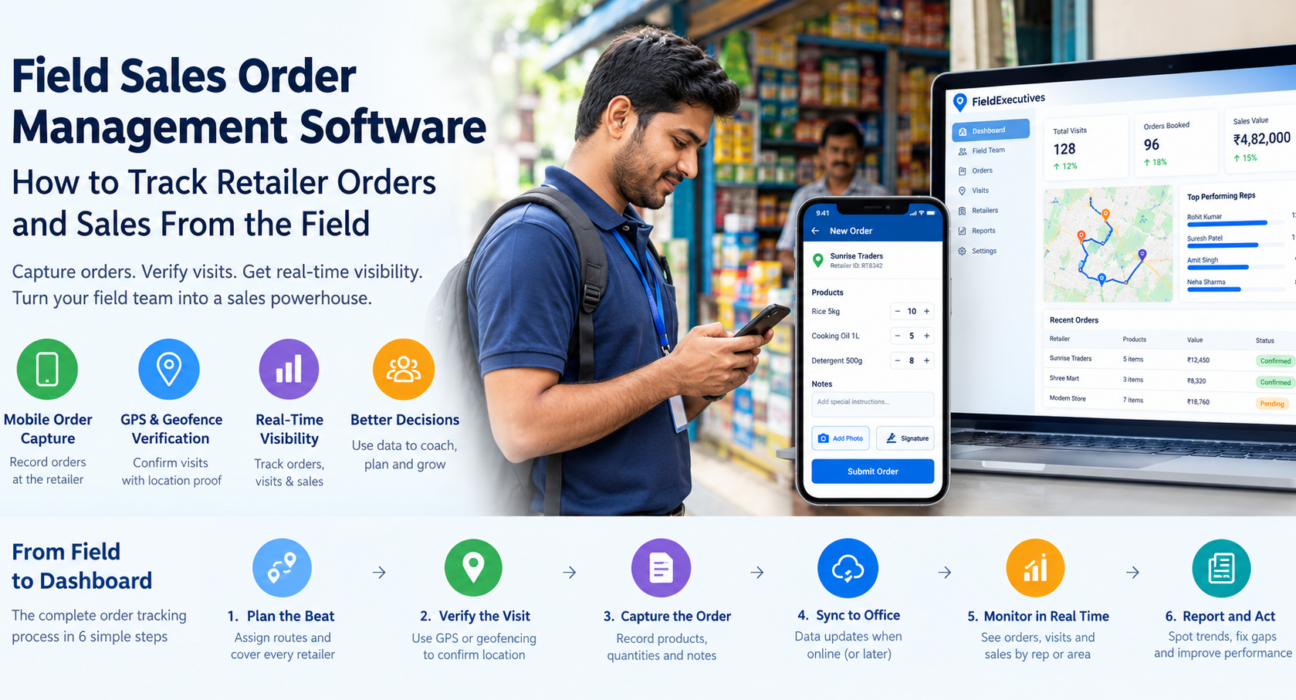
To track retailer orders from the field, plan the rep’s route, verify the visit, capture the order on a mobile form, sync it to the office, review it live, and report on the results. Here is the process in detail.
- Plan the beat. Assign each rep a route of retailers. A clear beat plan makes coverage measurable.
- Verify the visit. Confirm the rep is at the retailer’s location using GPS or geofencing.
- Capture the order on the spot. The rep records products, quantities and notes in a structured digital form rather than on paper.
- Sync the order. The order reaches the office as soon as the phone is online, even if it was captured offline.
- Monitor in real time. Managers see visits completed, orders booked and sales by rep, beat or area.
- Report and act. Review trends by retailer, product and territory, then coach reps or adjust coverage.
Key Features to Look For
Not every tool suits every sales team. Use this checklist when you evaluate field sales order management software.
| Capability | Why it matters |
|---|---|
| Mobile order capture with custom forms | Orders are recorded in a consistent, structured format |
| Offline-first operation | Reps can work in low-network outlets and sync later |
| GPS and geofenced visit verification | Confirms the rep was at the retailer |
| Beat plans and route planning | Keeps coverage organized and measurable |
| Proof capture (photo, signature, OTP) | Adds evidence to each visit |
| Real-time dashboards and reports | Gives managers live sales visibility |
| Collection tracking | Connects orders to the payments that follow |
| Integrations with CRM, ERP and accounting | Avoids re-entering order data |
Order capture that fits your business
Order formats differ. A distributor’s order form is not the same as a merchandiser’s. Look for a tool where you can configure fields without writing code.
Visit and order data in one place
Orders mean more when they sit next to visit data. If a retailer hasn’t been visited in three weeks and hasn’t ordered either, that pattern is easy to spot only when both records live together.
Best Practices for Managing Field Sales Orders
Software helps most when it supports good habits. These practices make order tracking reliable.
- Standardize the order form. Fewer free-text fields means cleaner data and fewer follow-up calls.
- Capture orders during the visit, not after. Same-day entry from memory is where errors creep in.
- Link orders to verified visits. An order recorded at the retailer’s location is more trustworthy than one entered from a car park.
- Review daily, not monthly. A short daily check on orders and missed visits catches problems early.
- Track collections alongside orders. Booked sales only matter once they are fulfilled and paid.
- Use the data to coach. Compare reps on visits, orders per visit and coverage, then support those who lag.
Manual Tracking vs. Order Management Software
| Area | Manual (notebooks, calls, spreadsheets) | Field sales order software |
|---|---|---|
| Order capture | Handwritten or phoned in later | Digital form at the retailer |
| Visit proof | Rep’s word | GPS and geofence verification |
| Data availability | End of day or week | Near real time |
| Accuracy | Prone to re-entry errors | Structured, consistent entries |
| Reporting | Manual compilation | Dashboards and reports |
| Scalability | Breaks as team grows | Handles more reps and retailers |
Who Benefits Most?
Any business that sells through retailers or dealers using a field team gains from this approach. Common examples include:
- FMCG and distribution companies managing beats, orders and coverage across many outlets.
- Retail and merchandising teams coordinating store visits and in-store activity.
- Consumer durables brands capturing dealer visits and demand.
- Pharma and healthcare distributors tracking chemist and distributor orders.
How FieldExecutives Helps You Track Retailer Orders and Sales
Businesses looking to simplify these processes can use field force management software such as FieldExecutives. It is built to manage field teams and field operations on one platform, with a mobile app for reps, a web console for managers and an admin portal for configuration.
Here is how its capabilities map to the order-tracking workflow:
- Beat plans and route planning: Assign structured routes so every retailer is covered. AI-based route optimisation helps reduce travel time.
- Verified visits: Geofenced attendance, GPS-stamped punch-ins and mock-location detection support trustworthy visit records.
- Custom forms: Build forms by drag-and-drop to capture the order details your business needs, without code.
- Proof capture: Collect photo, signature and OTP evidence during visits.
- Offline-first mobile app: Reps can work in low-network areas, and data syncs once they reconnect.
- Real-time visibility: A live map, KPIs and reports let managers see team activity as it happens.
- Collection tracking: Follow field collections through to settlement, so orders and payments stay connected.
- Integrations: FieldExecutives states that it can connect with CRM, ERP, accounting and HR systems, so order data doesn’t need to be re-keyed.
Its industry pages also cover use cases such as FMCG and distribution (beat plans, orders and coverage) and retail and merchandising. If order capture is your priority, ask for a demo built around your actual order flow.
Conclusion
Tracking retailer orders from the field comes down to three things: capture orders at the point of sale, verify that visits happened, and see the data while it still matters. Paper, calls and spreadsheets can’t do all three reliably once the team grows.
The right field sales order management software gives reps a simple way to book orders and gives managers a live view of orders and sales. Start by mapping your current order process, finding where it leaks, and choosing a tool that fits your workflow. FieldExecutives can help you bring order capture, visit verification and field reporting into one place.