Best CRM for BPO Companies in India: How to Choose the Right One
Ask a BPO manager what goes wrong on the calling floor, and the answers are rarely dramatic. A lead was assigned to the wrong agent. A callback promised for Tuesday never happened. Someone updated the Excel sheet, and someone else didn’t. A good CRM for BPO companies exists to stop exactly these small failures, because they add up to lost revenue.
This guide covers what to look for, how to compare your options, and where buyers usually go wrong.
What Is the Best CRM for BPO Companies in India?
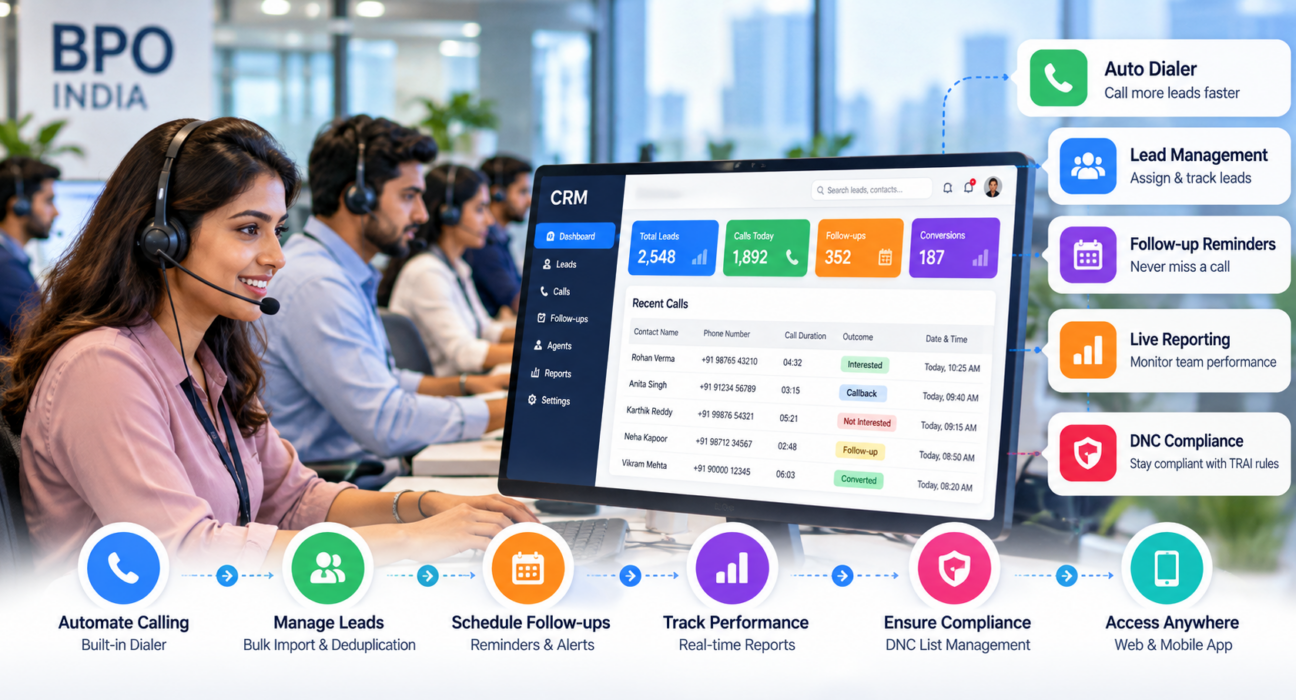
The best CRM for a BPO company is the one that fits the way your agents actually work. For outbound teams, that usually means a dialer, lead management, automatic call logging, follow-up reminders and live reporting in one system. Inbound or blended BPOs also need queue handling and telephony integration.
So there is no single winner. A 15-seat sales desk and a 300-seat multi-client support centre are different problems. Decide which one you are solving before you look at any software.
Why a Generic CRM Often Falls Short
Most general-purpose CRMs are built for people who update records a few times a day. A BPO agent is on calls for hours. Every extra click, every screen that loads slowly and every field that must be typed by hand eats into talk time.
That is why calling teams tend to prefer a telecaller CRM, meaning software designed around the call itself. The dialer, the call outcome and the next follow-up sit in the centre of the screen, not buried in a menu.
| What you need | Generic CRM | Calling-focused CRM |
|---|---|---|
| Dialer | Usually an add-on | Usually built in |
| Call logging | Often manual | Often automatic |
| Callbacks | Basic task lists | Scheduled reminders and overdue alerts |
| Live team view | Limited | Common |
| Best fit | Long, account-based sales | High-volume calling |
Treat this as a general pattern. Individual products differ, so test before you trust it.
The Features That Matter Most
Feature lists from vendors can run to fifty items. For a BPO, a handful decide whether the tool gets used.
The dialer and call log. A dialer saves agents from punching in numbers, and automatic logging of duration, outcome, notes and recordings keeps your data honest. If agents must type outcomes manually, expect inconsistent records within a week.
Lead handling. You need bulk import, duplicate removal and assignment rules. Without these, someone on your team spends the first hour of every day sorting sheets. Lead scoring helps when you have large lists and limited agent time, because the best prospects get called first.
Follow-up control. This is where most lead follow-up software earns its fee. Check for scheduled callbacks, reminders and alerts for overdue calls. A lead that is never called back is a lead you paid for and wasted.
Live visibility. Managers need to see talk time, idle time and outcomes while the shift is still running. Finding out the next morning that half the team was idle is too late to fix anything.
Lead source connections. If leads come from Meta ads, Google Ads, property portals or JustDial, direct integrations remove the manual upload and shorten the time to the first call. Speed to first call often matters more than the script.
Compliance support. India has TRAI rules on telemarketing, including the DND registry, and SMS campaigns need DLT registration. No CRM makes you compliant by itself. But DNC list management makes it much easier to avoid calling people you shouldn’t.
Mobile access. Work-from-home agents and field teams often prefer to call from their phones. If the CRM has a usable mobile app, you can hire and onboard without tying people to a desk.
How BPO Teams Use a Calling CRM in Practice
The following are hypothetical examples. They show how such software is typically used, not real customer results.
Take a BPO that books site visits for a real estate developer. Leads arrive from property portals and ad forms all day. With a CRM, each new lead is assigned to an agent within moments. When a buyer says “call me on Saturday morning”, the agent schedules the callback and the system reminds them. Without it, that promise lives in someone’s memory.
Now a collections desk. Agents call customers about pending payments and note the date each person promised to pay. The manager can see which promises were kept, which agents are actually reaching customers, and which accounts need escalation. Teams in this space can look at debt collection software built around these workflows.
Recruitment is similar. Recruiters call hundreds of candidates, record their status and schedule interview reminders. A recruitment CRM keeps those candidates from slipping through when a recruiter is on leave.
A Simple Way to Choose
Start with your call type. Outbound, inbound, collections and surveys all stress software differently.
Next, count your users honestly, including team leaders and managers. Then write down the three reports your managers check every evening. If a CRM cannot produce them, it is the wrong CRM, however good the demo looks.
After that, list your lead sources and confirm that the important ones connect without manual work. Ask how DNC checks and recording storage are handled.
Then run a trial. Import a small, real lead list and let three or four agents use it for a few days. A demo shows what the software can do. A trial shows what your team will actually do with it.
Finally, compare the full cost, not just the headline price. Add per-user fees, add-ons, setup charges and GST.
Mistakes Worth Avoiding
Buying on brand name is the most common one. A famous CRM may be excellent for account managers and clumsy for telecallers.
Ignoring agent experience is a close second. If the screen is slow or confusing, agents quietly go back to Excel, and you are paying for a tool nobody uses.
Other mistakes are quieter. Teams skip the trial. They forget to plan how existing leads and statuses will be migrated. They pay for modules they never open. And they leave reporting for last, then discover that the numbers managers need are not available.
What to Ask About Pricing
CRM pricing in India varies a lot. Some vendors charge per user per month. Others sell flat plans by team size. Some lock AI, WhatsApp, reporting or API access behind higher tiers.
Whichever vendor you talk to, ask these:
- Is the price per user, or per plan?
- Are all features included, or are some locked?
- Are there setup, training or integration charges?
- What happens to the bill when we add ten more agents?
- Is GST included, and is there an annual discount?
- What does the free trial include, and how long does it last?
Where TeleCalling CRM Fits
TeleCalling CRM is a telecalling CRM built for Indian outbound sales teams and call centres. From what its website publishes, it includes an auto dialer with call tracking and recordings, lead import with de-duplication and DNC checks, follow-up reminders, a sales pipeline, and a live view of agent activity with leaderboards and reports.
It also lists integrations with lead sources such as Facebook and Instagram Lead Ads, Google Ads, 99acres, Housing, MagicBricks, JustDial, Sulekha, WordPress, Wix and Google Sheets. Messaging covers WhatsApp templates, SMS through MSG91 with DLT, and email. There is a mobile app, and AI call analysis that transcribes and scores calls. The full list is on the features page.
On cost, the pricing page shows flat monthly plans for up to 5, 10 and 20 users, excluding GST, and the site mentions a 3-day free trial.
Now the limits. The product is positioned around outbound telecalling. If your BPO needs inbound queues, IVR, separate workspaces for each client, or more than 20 users, confirm that directly with the team or in the documentation before you commit. There is also a comparison page, but remember that it is written by the vendor.
A Short Rollout Checklist
Before you go live, clean your lead list and agree on your statuses, such as new, contacted, interested, follow-up and converted. Decide how leads will be assigned and how quickly a callback must happen. Set roles for agents, team leaders and managers. Upload your DNC list and confirm how it is checked. Train agents on call outcomes, since this is where data quality is won or lost. Pick three to five daily metrics, then review everything after two weeks and adjust.
Frequently Asked Questions
What is a CRM for BPO companies?
It is software that manages leads, calls, follow-ups, customer records and team performance for call-centre operations. It replaces spreadsheets and scattered notes with one system, so agents know whom to call next and managers can see what is happening during the shift.
Which CRM is best for a BPO in India?
It depends on your work. Outbound sales and collections teams usually do well with a calling-focused CRM that has a dialer, follow-ups and live reporting. Inbound or multi-client BPOs may need queue management and telephony integration. Shortlist two or three tools and test them with real data.
What features should a BPO CRM have?
At minimum: lead import and assignment, a dialer, automatic call logging, follow-up reminders, live agent monitoring, reports, role-based access, DNC management and mobile access. Integrations with your lead sources matter if you receive leads from ads or portals.
Is a telecaller CRM different from a normal CRM?
Yes. A telecaller CRM focuses on high-volume calling: dialing, call outcomes, callbacks and agent productivity. A normal CRM focuses on contacts, accounts and deals over longer sales cycles. Many teams choose a telecaller CRM when speed and call volume matter most.
How much does a call centre CRM cost in India?
It varies by vendor and pricing model. Some charge per user each month, others use flat plans by team size. TeleCalling CRM lists plans from ₹999 per month for up to 5 users, excluding GST. Always confirm current prices on the vendor’s website.
Can a CRM help with DNC compliance?
It can help by storing DNC lists and checking numbers before calls. It does not replace legal advice or your own compliance process. BPOs should follow current TRAI rules and confirm requirements with a qualified advisor.
How long does it take to set up a CRM in a BPO?
A small outbound team with clean data may be ready in a day or less. Larger operations with several clients, custom reports and data migration take longer. Planning your statuses, roles and import file in advance shortens the process.
Should I take a free trial before buying?
Yes. A trial with real leads and a few agents shows how the dialer, reports and follow-ups behave in daily use. Check what the trial includes and how long it runs before you start.
Conclusion
Choosing a CRM for BPO companies comes down to fit. Know your call type, list the features your agents will use every day, check compliance and total cost, and test with real data before rolling out to everyone.
If your team is mostly outbound, you can request a demo of a telecaller CRM like TeleCalling CRM and see whether it matches your workflow. A small pilot will tell you more than any feature list.