How to Manage Field Employees From One Dashboard
You can manage field employees from one dashboard by putting attendance, live location, task assignment, visit proof, expenses and reporting into a single system that both managers and field staff use. Field employee management software does this by replacing scattered spreadsheets, calls and WhatsApp groups with one live source of truth.
This guide explains why field teams are hard to manage, what a central dashboard should include, and how to set one up step by step.
Why Field Employees Are Hard to Manage
Once your team leaves the office, you lose visibility. You often can’t tell who is at which customer, whether a visit happened, or why a task is running late.
Most teams patch this gap with tools that were never built for field work:
- Paper registers or basic apps for attendance
- WhatsApp groups for task updates
- Spreadsheets for expenses and visit logs
- Phone calls to ask “where are you?”
The result is delayed information, disputed claims and hours lost to admin. Managers also can’t coach their teams properly without clean data on visits, delays and outcomes.
What Is a Field Employee Dashboard?
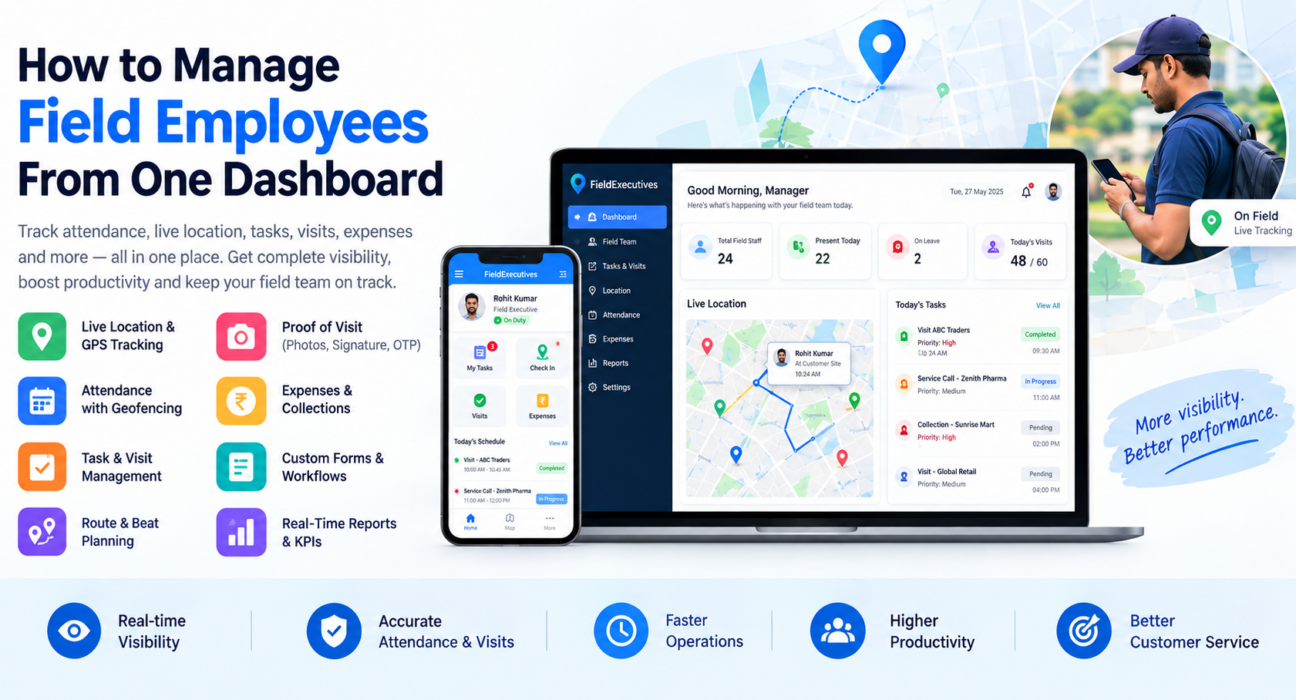
A field employee dashboard is a live, centralized view of everything your field team does: who is on duty, where they are, what they have completed and what is pending. It gives managers real-time visibility, and gives field staff a mobile app to record their work.
A good dashboard is more than a map. It connects to the workflows behind the work, such as assignment, execution, approvals and reporting.
What Should One Dashboard Show?
A complete dashboard should answer six questions at a glance:
- Who is working today? Punch-ins, late arrivals and absences.
- Where is everyone? Live location, status and route history.
- What is being done? Visits, tasks and jobs completed, active and pending.
- Was the work actually done? Photos, signatures, OTPs and checklists.
- Where does money move? Expense claims and collections.
- How is the team performing? SLAs, targets and KPIs.
If your current setup can’t answer these in one place, you have a visibility gap.
Core Features of Field Employee Management Software
1. Live Location and GPS Tracking
Live tracking shows every rep on one map with their current status. A GPS trail shows the path they actually took during the day.
This helps you reassign nearby staff when a job comes up, verify coverage and settle disputes about visits with data. Tracking should apply only to on-duty staff who have granted location permission. Setting that expectation openly also helps team trust.
2. Attendance With Geofencing
Attendance is where much field-team leakage starts. Reliable systems record the punch-in time on the server rather than the phone, restrict punch-ins to defined locations with geofencing, and flag mock-location apps.
3. Task and Visit Management
Managers create tasks or visits with a checklist, priority and deadline, and the assigned rep sees them on their phone. This replaces “please visit this client today” messages with trackable work items.
4. Route and Beat Planning
Beat planning sets which customers or outlets a rep covers and in what order. Route optimization arranges those stops to cut unnecessary travel. This matters most for FMCG, distribution, pharma and field sales teams with many daily stops.
5. Proof of Visit
Proof capture makes sure a visit is verifiable. Reps add a photo, signature or OTP before closing a job, which gives you proof of presence (where they were) and proof of work (what they did).
6. Expenses and Collections
Field employees often submit expenses late and with poor documentation. Software with receipt-backed claims and an approval workflow shortens the cycle and reduces disputes. Collections should also be tracked from the field through to settlement.
7. Custom Forms and Workflows
Every field team works differently. A courier company, a pharma team and a facility manager need different fields, checklists and approvals. Look for software that lets you configure these without writing code.
8. Offline Capability
Field staff often work in areas with weak signal. An offline-first mobile app lets reps punch in, complete visits and capture proof without a network, then sync when they reconnect.
9. Real-Time Reports and KPIs
Dashboards should turn activity into numbers you can act on: visits per rep, SLA adherence, attendance patterns and target progress. Leaderboards and reports help you coach people using facts rather than impressions.
How to Manage Field Employees From One Dashboard: Step by Step
- Define what you need to see. List your key questions, such as attendance, visits completed, SLA breaches and expense turnaround.
- Map your field workflow. Write down how work moves from assignment to completion, including proof requirements and approvals.
- Set up users, roles and hierarchy. Decide who sees what: field reps, team leads, managers and owners.
- Configure work types and forms. Create job types, checklists and forms that match how your team actually works.
- Set attendance rules and geofences. Define work locations and punch-in requirements.
- Assign tasks and plan routes. Use beat plans and route ordering so each day starts with a clear plan.
- Onboard the field team. Have reps install the mobile app and run a short trial week before full rollout.
- Review data weekly. Use dashboard reports to spot late visits, missed SLAs and underperforming routes, then coach accordingly.
Spreadsheets vs. a Central Dashboard
| Area | Spreadsheets / WhatsApp | Field employee management software |
|---|---|---|
| Attendance | Manual or self-reported | Server-time, geofenced punch-in |
| Location visibility | Phone calls | Live map and GPS trail |
| Task tracking | Chat messages | Assigned tasks with status |
| Visit verification | Trust-based | Photo, signature or OTP proof |
| Expenses | Paper or email claims | Digital claims with approvals |
| Reporting | Built manually | Real-time KPIs and reports |
How to Choose Field Employee Management Software
Ask these questions when comparing tools:
- Does it cover the full workflow (assignment, execution, proof, expenses) or only tracking?
- Does the mobile app work offline?
- Can you configure forms, checklists and approvals without code?
- Does it support your industry’s workflow, such as beat plans, service calls or collections?
- Can it integrate with your CRM, ERP or HR systems?
- Is pricing clear as your team grows?
- Can you try it before committing?
How FieldExecutives Helps You Manage Field Teams From One Dashboard
Businesses looking to simplify these processes can use field force management software such as FieldExecutives. It is built around a single real-time backend with three surfaces: a mobile app for field executives, a web console for managers and directors, and an admin portal for business owners.
Based on the FieldExecutives website, the platform includes:
- Live map and GPS tracking with a breadcrumb trail of each rep’s movements
- Geofenced attendance with server-time punch-ins and mock-location detection
- Task and visit assignment with checklists and SLA timers
- Proof capture through photo, signature and OTP
- AI route and beat-plan optimization with distance and ETA per stop
- Expense and collection workflows, including receipt-backed claims with approvals
- A custom forms builder for industry-specific workflows
- Offline-first mobile capture, with real-time KPIs and reports for managers
It supports industries such as FMCG and distribution, pharma, logistics, field service and repair, banking and collections, telecom, facility management and retail. Your results will depend on your team, workflows and adoption.
Best Practices for Running a Field Team From a Dashboard
- Be transparent. Tell your team what is tracked, when and why. Trust improves adoption.
- Start with a pilot. Roll out to one team before scaling to everyone.
- Keep forms short. Long forms slow reps down and reduce data quality.
- Use data to coach, not only to police. Share leaderboards and route insights so reps can improve.
- Review a small set of KPIs. Focus on attendance, visit completion, SLA adherence and expense turnaround before adding more.
- Retire old tools. If reps must update spreadsheets and the app, adoption will suffer.
Conclusion
Managing field employees gets easier when the work, the people and the proof live in one place. A central dashboard gives you live visibility, verified attendance and visits, clean expense and collection data, and reports you can act on.
The right field employee management software should cover the whole workflow, not just tracking. FieldExecutives brings live tracking, geofenced attendance, tasks, proof, route planning, expenses and KPIs into one platform for your field team.